> ## Documentation Index
> Fetch the complete documentation index at: https://helpcenter.magure.ai/llms.txt
> Use this file to discover all available pages before exploring further.
# KYB document verification
> Build a Know Your Business document verification workflow with parallel AI agents
## What you'll build
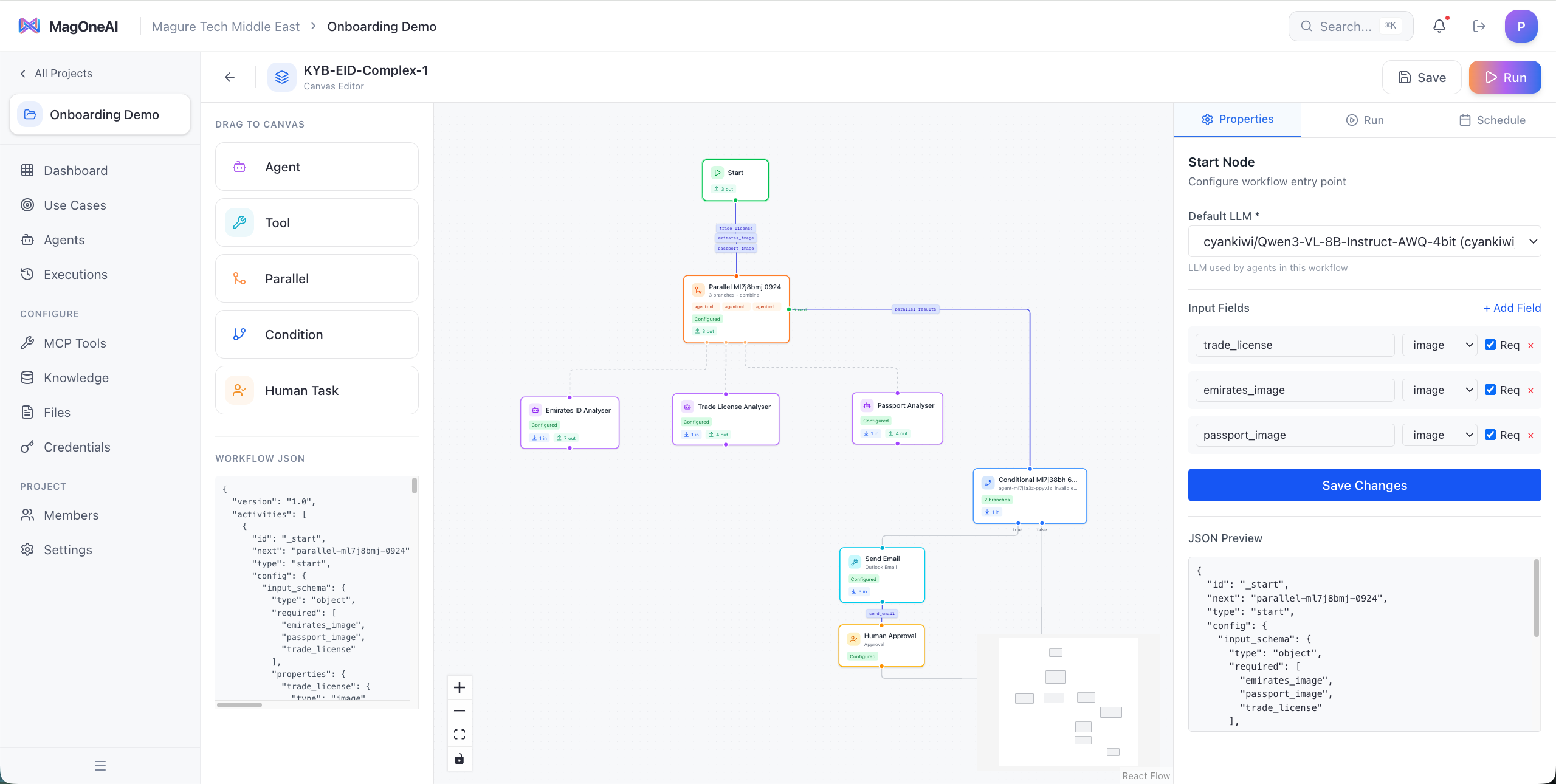
You'll build a comprehensive KYB (Know Your Business) verification workflow that processes multiple identity documents in parallel using AI vision models. The workflow analyzes Emirates ID, trade license, and passport documents simultaneously, merges the results, and routes them through confidence-based validation before sending verification results.
This workflow demonstrates how to:
* Process multiple documents concurrently for faster verification
* Use private vision models for sensitive identity data
* Implement human-in-the-loop approval for low-confidence cases
* Automate the verification notification process
 ## Prerequisites
Before you begin, ensure you have:
* **MagOneAI instance** with access to the workflow builder
* **Vision model access** — either:
* Private vision model (Qwen3-VL recommended for sensitive documents)
* Cloud vision model (GPT-4V, Claude 3.5 Sonnet)
* **Email tool configured** for sending verification results
* **Sample documents** for testing (Emirates ID, trade license, passport)
For KYB workflows handling sensitive identity documents, we strongly recommend using a privately hosted vision model to ensure data privacy and compliance.
## Architecture
The KYB verification workflow follows a parallel processing pattern that maximizes efficiency while maintaining accuracy:
```
Trigger (Upload documents)
↓
Parallel Node
├── Branch 1: Emirates ID Analysis Agent
├── Branch 2: Trade License Analysis Agent
└── Branch 3: Passport Analysis Agent
↓
Merge Agent (Consolidate findings)
↓
Condition Node (Check confidence scores)
├── High Confidence → Auto-approve
└── Low Confidence → Human Task
↓
Email Notification (Send results)
```
### Workflow components
Three document analysis agents run simultaneously to reduce total processing time from \~45s to \~15s
Each agent uses vision capabilities to extract text, verify authenticity, and validate document structure
Automatically routes low-confidence results to human reviewers while approving high-confidence cases
Captures all verification steps, confidence scores, and approval decisions for compliance
## Step-by-step build
Start by creating a new project in MagOneAI and setting up the four agents you'll need.
**Navigate to Projects** → **Create New Project** → Name it "KYB Document Verification"
**Create four agents:**
1. **Emirates ID Analyzer**
* **Name:** Emirates ID Analyzer
* **Model:** Qwen3-VL (private) or GPT-4V
* **Persona:**
```
You are a document verification specialist focused on Emirates ID analysis.
Your tasks:
- Extract all text fields from the Emirates ID (name, ID number, nationality, date of birth, expiry date)
- Verify document authenticity markers (hologram presence, format compliance)
- Check for signs of tampering or forgery
- Validate expiry date and flag if expired
- Assign a confidence score (0-100) based on document quality and clarity
Output format:
{
"document_type": "Emirates ID",
"extracted_data": { ... },
"authenticity_checks": { ... },
"confidence_score": 95,
"issues": [],
"recommendation": "APPROVE"
}
```
2. **Trade License Analyzer**
* **Name:** Trade License Analyzer
* **Model:** Qwen3-VL (private) or GPT-4V
* **Persona:**
```
You are a document verification specialist focused on UAE trade license analysis.
Your tasks:
- Extract business details (company name, license number, activity, issuing authority)
- Verify license format matches UAE standards
- Check expiry date and validity status
- Validate issuing authority authenticity
- Assign a confidence score (0-100)
Output format:
{
"document_type": "Trade License",
"extracted_data": { ... },
"validity_checks": { ... },
"confidence_score": 90,
"issues": [],
"recommendation": "APPROVE"
}
```
3. **Passport Analyzer**
* **Name:** Passport Analyzer
* **Model:** Qwen3-VL (private) or GPT-4V
* **Persona:**
```
You are a document verification specialist focused on passport analysis.
Your tasks:
- Extract passport details (number, name, nationality, DOB, expiry)
- Verify MRZ (Machine Readable Zone) format and checksums
- Check for security features (photo quality, watermarks)
- Validate expiry date
- Cross-check bio page consistency
- Assign a confidence score (0-100)
Output format:
{
"document_type": "Passport",
"extracted_data": { ... },
"security_checks": { ... },
"confidence_score": 98,
"issues": [],
"recommendation": "APPROVE"
}
```
4. **Merge & Summary Agent**
* **Name:** KYB Summary Agent
* **Model:** GPT-4 or Claude 3.5 Sonnet (text model)
* **Persona:**
```
You are a KYB verification coordinator who consolidates findings from multiple document analyses.
Your tasks:
- Merge results from Emirates ID, Trade License, and Passport analyses
- Cross-validate information consistency (e.g., name matches across all documents)
- Calculate overall verification confidence
- Flag any discrepancies or issues
- Provide a clear APPROVE/REVIEW/REJECT recommendation
Output format:
{
"overall_confidence": 94,
"verification_status": "APPROVED",
"cross_validation": { ... },
"discrepancies": [],
"final_recommendation": "All documents verified successfully"
}
```
Open the workflow builder and add the initial nodes.
1. **Add Trigger Node**
* Type: **Manual Trigger** (or API trigger if integrating with your system)
* Configure inputs:
* `emirates_id_image` (file)
* `trade_license_image` (file)
* `passport_image` (file)
* `applicant_name` (text)
* `application_id` (text)
2. **Add Parallel Node**
* Drag a **Parallel Node** onto the canvas
* Connect it to the trigger
* You'll configure the branches in the next step
Set up three parallel branches, one for each document type.
**In the Parallel Node configuration:**
1. **Branch 1 - Emirates ID**
* Add **Agent Node**: Emirates ID Analyzer
* Map input: `{{trigger.emirates_id_image}}`
* Enable vision mode
2. **Branch 2 - Trade License**
* Add **Agent Node**: Trade License Analyzer
* Map input: `{{trigger.trade_license_image}}`
* Enable vision mode
3. **Branch 3 - Passport**
* Add **Agent Node**: Passport Analyzer
* Map input: `{{trigger.passport_image}}`
* Enable vision mode
All three branches execute simultaneously, reducing total processing time significantly.
After the Parallel Node, add the merge agent to consolidate findings.
1. **Add Agent Node**: KYB Summary Agent
2. **Configure inputs** to receive all three parallel outputs:
```
Emirates ID Analysis: {{parallel.branch1}}
Trade License Analysis: {{parallel.branch2}}
Passport Analysis: {{parallel.branch3}}
Applicant Name: {{trigger.applicant_name}}
```
3. **Enable structured output** to ensure consistent JSON format
Add a Condition Node to route based on confidence scores.
1. **Add Condition Node** after the merge agent
2. **Configure condition:**
```
IF {{merge_agent.overall_confidence}} >= 85
THEN: High Confidence Branch
ELSE: Low Confidence Branch
```
3. **Label branches** clearly: "Auto-Approve" and "Human Review"
Set your confidence threshold based on your risk tolerance. Higher thresholds (90+) reduce false positives but increase manual reviews.
On the "Human Review" branch, add a Human Task node.
1. **Add Human Task Node**
2. **Configure task:**
* **Title:** KYB Document Review Required
* **Description:**
```
Confidence score below threshold. Please review:
Application ID: {{trigger.application_id}}
Applicant: {{trigger.applicant_name}}
Overall Confidence: {{merge_agent.overall_confidence}}%
Issues Found:
{{merge_agent.discrepancies}}
Please review the attached documents and analysis results.
```
* **Task type:** Approval
* **Assignee:** A compliance reviewer's user ID (a template like `{{system.user_id}}` also works; assign one or more reviewers)
* **Context fields:** Surface the merge agent output and document analyses for the reviewer (the previous activity output is included automatically)
* **Decision question:** A `choice` question with options Approve, Reject, and Request More Info, wired to approval branches
3. **Add merge point** after Human Task to rejoin with auto-approve branch
Add a final Tool Node to send verification results.
1. **Add Tool Node**: Email
2. **Configure email:**
* **To:** `{{trigger.applicant_email}}`
* **Subject:**
```
KYB Verification Complete - Application {{trigger.application_id}}
```
* **Body:**
```
Dear {{trigger.applicant_name}},
Your KYB verification has been completed.
Application ID: {{trigger.application_id}}
Status: {{merge_agent.verification_status}}
Verification Date: {{$now}}
{{#if human_task}}
This application was reviewed by our compliance team.
{{/if}}
Thank you for your submission.
Best regards,
Verification Team
```
3. **Add condition** to customize email based on approval/rejection status
Test your workflow with sample documents to verify it works correctly.
1. **Prepare test documents:**
* Sample Emirates ID (use test data, not real IDs)
* Sample trade license
* Sample passport
2. **Run the workflow** with test inputs
3. **Verify:**
* All three agents execute in parallel
* Merge agent consolidates results correctly
* Condition routing works based on confidence
* Email notification sends successfully
4. **Test edge cases:**
* Expired document
* Low-quality image
* Missing document
* Mismatched names across documents
Monitor the execution logs to see parallel execution timing. You should see all three document agents start within milliseconds of each other.
## Key concepts demonstrated
Deploy vision models (like Qwen3-VL) on your own infrastructure to ensure sensitive identity documents never leave your network.
Process multiple documents simultaneously using the Parallel Node, reducing total workflow time by 60-70%.
Dynamically route execution based on AI confidence scores, balancing automation with human oversight.
Seamlessly escalate low-confidence cases to human reviewers while auto-processing high-confidence ones.
Use multimodal AI models to analyze document images, extract text, and verify authenticity markers.
Connect to email, ticketing, or CRM systems to automate downstream notifications and record-keeping.
## Customization ideas
Take this workflow further by adding these enhancements:
Extend the parallel processing to include additional documents:
* Utility bills for address verification
* Bank statements for financial verification
* Articles of Association for corporate structure
* Shareholder certificates
Simply add more branches to the Parallel Node and create specialized agents for each document type.
Connect to external databases for enhanced verification:
* UAE government databases (if you have API access)
* International sanctions lists
* Corporate registry lookups
* Credit bureau checks
Add Tool Nodes or API calls after document extraction to cross-reference extracted data.
For low-quality images, add a preprocessing step:
* Image enhancement (contrast, brightness, deskew)
* OCR with Tesseract or cloud OCR services
* Text extraction before vision model analysis
This improves accuracy for scanned or photographed documents.
Automate compliance workflows:
* Log all verifications to compliance management systems
* Trigger AML/CFT screening workflows
* Generate audit reports automatically
* Archive documents in compliant storage
Add Tool Nodes to integrate with your compliance infrastructure.
Handle documents in multiple languages:
* Add language detection in document analysis agents
* Configure agents with multilingual capabilities
* Translate extracted data to a common language for cross-validation
* Support Arabic, English, and other languages common in UAE business
Enhance security with dedicated fraud detection:
* Create a fraud detection agent that analyzes document metadata
* Check for common forgery patterns
* Validate photo quality and tampering signs
* Calculate fraud risk score
* Flag high-risk applications for enhanced review
## Next steps
Now that you've built a KYB verification workflow, explore these related cookbooks:
* **[Document Compliance Review](/cookbooks/document-compliance-review)** - Learn to analyze contracts and legal documents
* **[IT Support Triage](/cookbooks/it-support-triage)** - See another example of confidence-based routing
* **[RFP Proposal Analysis](/cookbooks/rfp-proposal-analysis)** - Explore more parallel agent patterns
Need help? Join our community or contact support for assistance with implementing KYB workflows in production.
## Prerequisites
Before you begin, ensure you have:
* **MagOneAI instance** with access to the workflow builder
* **Vision model access** — either:
* Private vision model (Qwen3-VL recommended for sensitive documents)
* Cloud vision model (GPT-4V, Claude 3.5 Sonnet)
* **Email tool configured** for sending verification results
* **Sample documents** for testing (Emirates ID, trade license, passport)
For KYB workflows handling sensitive identity documents, we strongly recommend using a privately hosted vision model to ensure data privacy and compliance.
## Architecture
The KYB verification workflow follows a parallel processing pattern that maximizes efficiency while maintaining accuracy:
```
Trigger (Upload documents)
↓
Parallel Node
├── Branch 1: Emirates ID Analysis Agent
├── Branch 2: Trade License Analysis Agent
└── Branch 3: Passport Analysis Agent
↓
Merge Agent (Consolidate findings)
↓
Condition Node (Check confidence scores)
├── High Confidence → Auto-approve
└── Low Confidence → Human Task
↓
Email Notification (Send results)
```
### Workflow components
Three document analysis agents run simultaneously to reduce total processing time from \~45s to \~15s
Each agent uses vision capabilities to extract text, verify authenticity, and validate document structure
Automatically routes low-confidence results to human reviewers while approving high-confidence cases
Captures all verification steps, confidence scores, and approval decisions for compliance
## Step-by-step build
Start by creating a new project in MagOneAI and setting up the four agents you'll need.
**Navigate to Projects** → **Create New Project** → Name it "KYB Document Verification"
**Create four agents:**
1. **Emirates ID Analyzer**
* **Name:** Emirates ID Analyzer
* **Model:** Qwen3-VL (private) or GPT-4V
* **Persona:**
```
You are a document verification specialist focused on Emirates ID analysis.
Your tasks:
- Extract all text fields from the Emirates ID (name, ID number, nationality, date of birth, expiry date)
- Verify document authenticity markers (hologram presence, format compliance)
- Check for signs of tampering or forgery
- Validate expiry date and flag if expired
- Assign a confidence score (0-100) based on document quality and clarity
Output format:
{
"document_type": "Emirates ID",
"extracted_data": { ... },
"authenticity_checks": { ... },
"confidence_score": 95,
"issues": [],
"recommendation": "APPROVE"
}
```
2. **Trade License Analyzer**
* **Name:** Trade License Analyzer
* **Model:** Qwen3-VL (private) or GPT-4V
* **Persona:**
```
You are a document verification specialist focused on UAE trade license analysis.
Your tasks:
- Extract business details (company name, license number, activity, issuing authority)
- Verify license format matches UAE standards
- Check expiry date and validity status
- Validate issuing authority authenticity
- Assign a confidence score (0-100)
Output format:
{
"document_type": "Trade License",
"extracted_data": { ... },
"validity_checks": { ... },
"confidence_score": 90,
"issues": [],
"recommendation": "APPROVE"
}
```
3. **Passport Analyzer**
* **Name:** Passport Analyzer
* **Model:** Qwen3-VL (private) or GPT-4V
* **Persona:**
```
You are a document verification specialist focused on passport analysis.
Your tasks:
- Extract passport details (number, name, nationality, DOB, expiry)
- Verify MRZ (Machine Readable Zone) format and checksums
- Check for security features (photo quality, watermarks)
- Validate expiry date
- Cross-check bio page consistency
- Assign a confidence score (0-100)
Output format:
{
"document_type": "Passport",
"extracted_data": { ... },
"security_checks": { ... },
"confidence_score": 98,
"issues": [],
"recommendation": "APPROVE"
}
```
4. **Merge & Summary Agent**
* **Name:** KYB Summary Agent
* **Model:** GPT-4 or Claude 3.5 Sonnet (text model)
* **Persona:**
```
You are a KYB verification coordinator who consolidates findings from multiple document analyses.
Your tasks:
- Merge results from Emirates ID, Trade License, and Passport analyses
- Cross-validate information consistency (e.g., name matches across all documents)
- Calculate overall verification confidence
- Flag any discrepancies or issues
- Provide a clear APPROVE/REVIEW/REJECT recommendation
Output format:
{
"overall_confidence": 94,
"verification_status": "APPROVED",
"cross_validation": { ... },
"discrepancies": [],
"final_recommendation": "All documents verified successfully"
}
```
Open the workflow builder and add the initial nodes.
1. **Add Trigger Node**
* Type: **Manual Trigger** (or API trigger if integrating with your system)
* Configure inputs:
* `emirates_id_image` (file)
* `trade_license_image` (file)
* `passport_image` (file)
* `applicant_name` (text)
* `application_id` (text)
2. **Add Parallel Node**
* Drag a **Parallel Node** onto the canvas
* Connect it to the trigger
* You'll configure the branches in the next step
Set up three parallel branches, one for each document type.
**In the Parallel Node configuration:**
1. **Branch 1 - Emirates ID**
* Add **Agent Node**: Emirates ID Analyzer
* Map input: `{{trigger.emirates_id_image}}`
* Enable vision mode
2. **Branch 2 - Trade License**
* Add **Agent Node**: Trade License Analyzer
* Map input: `{{trigger.trade_license_image}}`
* Enable vision mode
3. **Branch 3 - Passport**
* Add **Agent Node**: Passport Analyzer
* Map input: `{{trigger.passport_image}}`
* Enable vision mode
All three branches execute simultaneously, reducing total processing time significantly.
After the Parallel Node, add the merge agent to consolidate findings.
1. **Add Agent Node**: KYB Summary Agent
2. **Configure inputs** to receive all three parallel outputs:
```
Emirates ID Analysis: {{parallel.branch1}}
Trade License Analysis: {{parallel.branch2}}
Passport Analysis: {{parallel.branch3}}
Applicant Name: {{trigger.applicant_name}}
```
3. **Enable structured output** to ensure consistent JSON format
Add a Condition Node to route based on confidence scores.
1. **Add Condition Node** after the merge agent
2. **Configure condition:**
```
IF {{merge_agent.overall_confidence}} >= 85
THEN: High Confidence Branch
ELSE: Low Confidence Branch
```
3. **Label branches** clearly: "Auto-Approve" and "Human Review"
Set your confidence threshold based on your risk tolerance. Higher thresholds (90+) reduce false positives but increase manual reviews.
On the "Human Review" branch, add a Human Task node.
1. **Add Human Task Node**
2. **Configure task:**
* **Title:** KYB Document Review Required
* **Description:**
```
Confidence score below threshold. Please review:
Application ID: {{trigger.application_id}}
Applicant: {{trigger.applicant_name}}
Overall Confidence: {{merge_agent.overall_confidence}}%
Issues Found:
{{merge_agent.discrepancies}}
Please review the attached documents and analysis results.
```
* **Task type:** Approval
* **Assignee:** A compliance reviewer's user ID (a template like `{{system.user_id}}` also works; assign one or more reviewers)
* **Context fields:** Surface the merge agent output and document analyses for the reviewer (the previous activity output is included automatically)
* **Decision question:** A `choice` question with options Approve, Reject, and Request More Info, wired to approval branches
3. **Add merge point** after Human Task to rejoin with auto-approve branch
Add a final Tool Node to send verification results.
1. **Add Tool Node**: Email
2. **Configure email:**
* **To:** `{{trigger.applicant_email}}`
* **Subject:**
```
KYB Verification Complete - Application {{trigger.application_id}}
```
* **Body:**
```
Dear {{trigger.applicant_name}},
Your KYB verification has been completed.
Application ID: {{trigger.application_id}}
Status: {{merge_agent.verification_status}}
Verification Date: {{$now}}
{{#if human_task}}
This application was reviewed by our compliance team.
{{/if}}
Thank you for your submission.
Best regards,
Verification Team
```
3. **Add condition** to customize email based on approval/rejection status
Test your workflow with sample documents to verify it works correctly.
1. **Prepare test documents:**
* Sample Emirates ID (use test data, not real IDs)
* Sample trade license
* Sample passport
2. **Run the workflow** with test inputs
3. **Verify:**
* All three agents execute in parallel
* Merge agent consolidates results correctly
* Condition routing works based on confidence
* Email notification sends successfully
4. **Test edge cases:**
* Expired document
* Low-quality image
* Missing document
* Mismatched names across documents
Monitor the execution logs to see parallel execution timing. You should see all three document agents start within milliseconds of each other.
## Key concepts demonstrated
Deploy vision models (like Qwen3-VL) on your own infrastructure to ensure sensitive identity documents never leave your network.
Process multiple documents simultaneously using the Parallel Node, reducing total workflow time by 60-70%.
Dynamically route execution based on AI confidence scores, balancing automation with human oversight.
Seamlessly escalate low-confidence cases to human reviewers while auto-processing high-confidence ones.
Use multimodal AI models to analyze document images, extract text, and verify authenticity markers.
Connect to email, ticketing, or CRM systems to automate downstream notifications and record-keeping.
## Customization ideas
Take this workflow further by adding these enhancements:
Extend the parallel processing to include additional documents:
* Utility bills for address verification
* Bank statements for financial verification
* Articles of Association for corporate structure
* Shareholder certificates
Simply add more branches to the Parallel Node and create specialized agents for each document type.
Connect to external databases for enhanced verification:
* UAE government databases (if you have API access)
* International sanctions lists
* Corporate registry lookups
* Credit bureau checks
Add Tool Nodes or API calls after document extraction to cross-reference extracted data.
For low-quality images, add a preprocessing step:
* Image enhancement (contrast, brightness, deskew)
* OCR with Tesseract or cloud OCR services
* Text extraction before vision model analysis
This improves accuracy for scanned or photographed documents.
Automate compliance workflows:
* Log all verifications to compliance management systems
* Trigger AML/CFT screening workflows
* Generate audit reports automatically
* Archive documents in compliant storage
Add Tool Nodes to integrate with your compliance infrastructure.
Handle documents in multiple languages:
* Add language detection in document analysis agents
* Configure agents with multilingual capabilities
* Translate extracted data to a common language for cross-validation
* Support Arabic, English, and other languages common in UAE business
Enhance security with dedicated fraud detection:
* Create a fraud detection agent that analyzes document metadata
* Check for common forgery patterns
* Validate photo quality and tampering signs
* Calculate fraud risk score
* Flag high-risk applications for enhanced review
## Next steps
Now that you've built a KYB verification workflow, explore these related cookbooks:
* **[Document Compliance Review](/cookbooks/document-compliance-review)** - Learn to analyze contracts and legal documents
* **[IT Support Triage](/cookbooks/it-support-triage)** - See another example of confidence-based routing
* **[RFP Proposal Analysis](/cookbooks/rfp-proposal-analysis)** - Explore more parallel agent patterns
Need help? Join our community or contact support for assistance with implementing KYB workflows in production.