> ## Documentation Index
> Fetch the complete documentation index at: https://helpcenter.magure.ai/llms.txt
> Use this file to discover all available pages before exploring further.
# Infrastructure
> Enterprise deployment architecture — Kubernetes, cloud infrastructure, LLM hosting, and network security
## Platform overview
MagOneAI is an enterprise-grade AI agent platform that enables organizations to deploy intelligent agents, automated workflows, integrated tools, and managed knowledge bases securely on Kubernetes infrastructure.
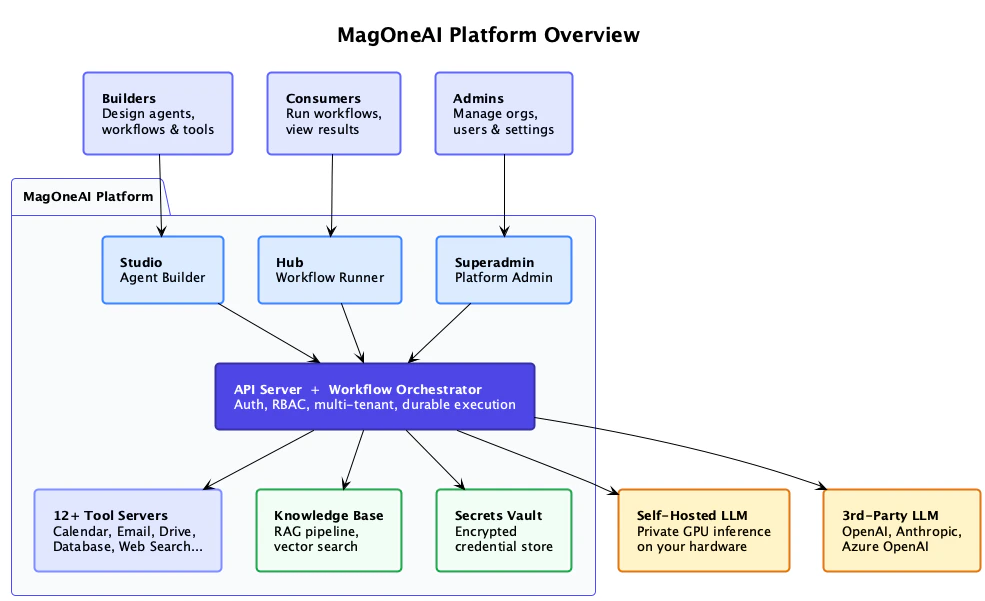 Design agents, workflows, and tools in **MagOneAI Studio**
Run workflows and view results in **MagOneAI Hub**
Manage orgs, users, and settings in the **Superadmin Portal**
All three portals connect to a central **API Server + Workflow Orchestrator** that handles authentication, RBAC, multi-tenancy, and durable execution. The backend connects to:
* **12 Tool Servers** — Calendar, Email, Drive, Database, Web Search, and more via MCP
* **Knowledge Base** — RAG pipeline with hybrid vector search
* **Secrets Vault** — Encrypted credential store (HashiCorp Vault)
* **Self-Hosted LLM** — Private GPU inference on your hardware (optional)
* **3rd-Party LLM** — OpenAI, Anthropic, Azure OpenAI APIs
***
## Deployment model
MagOneAI is deployed directly within your cloud environment, ensuring all data remains securely within your infrastructure. MagureLabs manages the deployment remotely via a dedicated control plane, enabling seamless provisioning and operational oversight.
Design agents, workflows, and tools in **MagOneAI Studio**
Run workflows and view results in **MagOneAI Hub**
Manage orgs, users, and settings in the **Superadmin Portal**
All three portals connect to a central **API Server + Workflow Orchestrator** that handles authentication, RBAC, multi-tenancy, and durable execution. The backend connects to:
* **12 Tool Servers** — Calendar, Email, Drive, Database, Web Search, and more via MCP
* **Knowledge Base** — RAG pipeline with hybrid vector search
* **Secrets Vault** — Encrypted credential store (HashiCorp Vault)
* **Self-Hosted LLM** — Private GPU inference on your hardware (optional)
* **3rd-Party LLM** — OpenAI, Anthropic, Azure OpenAI APIs
***
## Deployment model
MagOneAI is deployed directly within your cloud environment, ensuring all data remains securely within your infrastructure. MagureLabs manages the deployment remotely via a dedicated control plane, enabling seamless provisioning and operational oversight.
 ### How it works
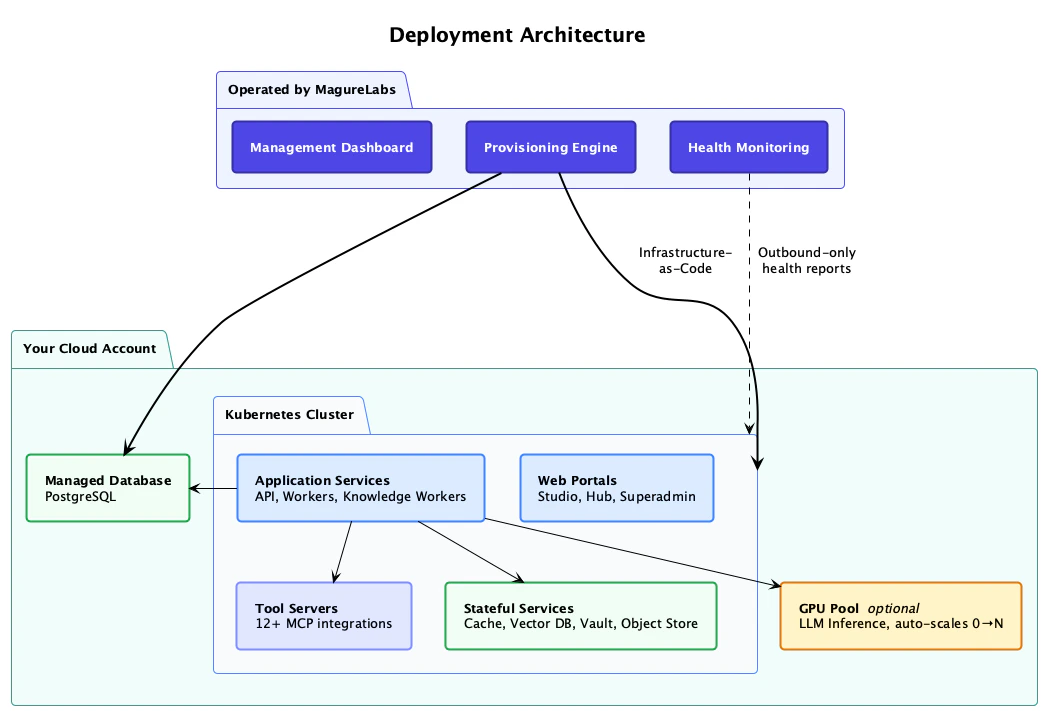
Operated by MagureLabs, the control plane includes:
* **Management Dashboard** — Configuration and deployment management
* **Provisioning Engine** — Infrastructure-as-Code deployment into your account
* **Health Monitoring** — Outbound-only health reports from your cluster
All application workloads run in your account:
* **Kubernetes Cluster** — Application services, web portals, tool servers
* **Managed Database** — PostgreSQL with HA and automated backups
* **Stateful Services** — Cache, Vector DB, Vault, Object Store
* **GPU Pool** (optional) — LLM inference, auto-scales 0 to N
MagureLabs uses Infrastructure-as-Code to provision resources and receives only outbound health reports. No inbound access to your cluster is required.
***
## Cloud infrastructure
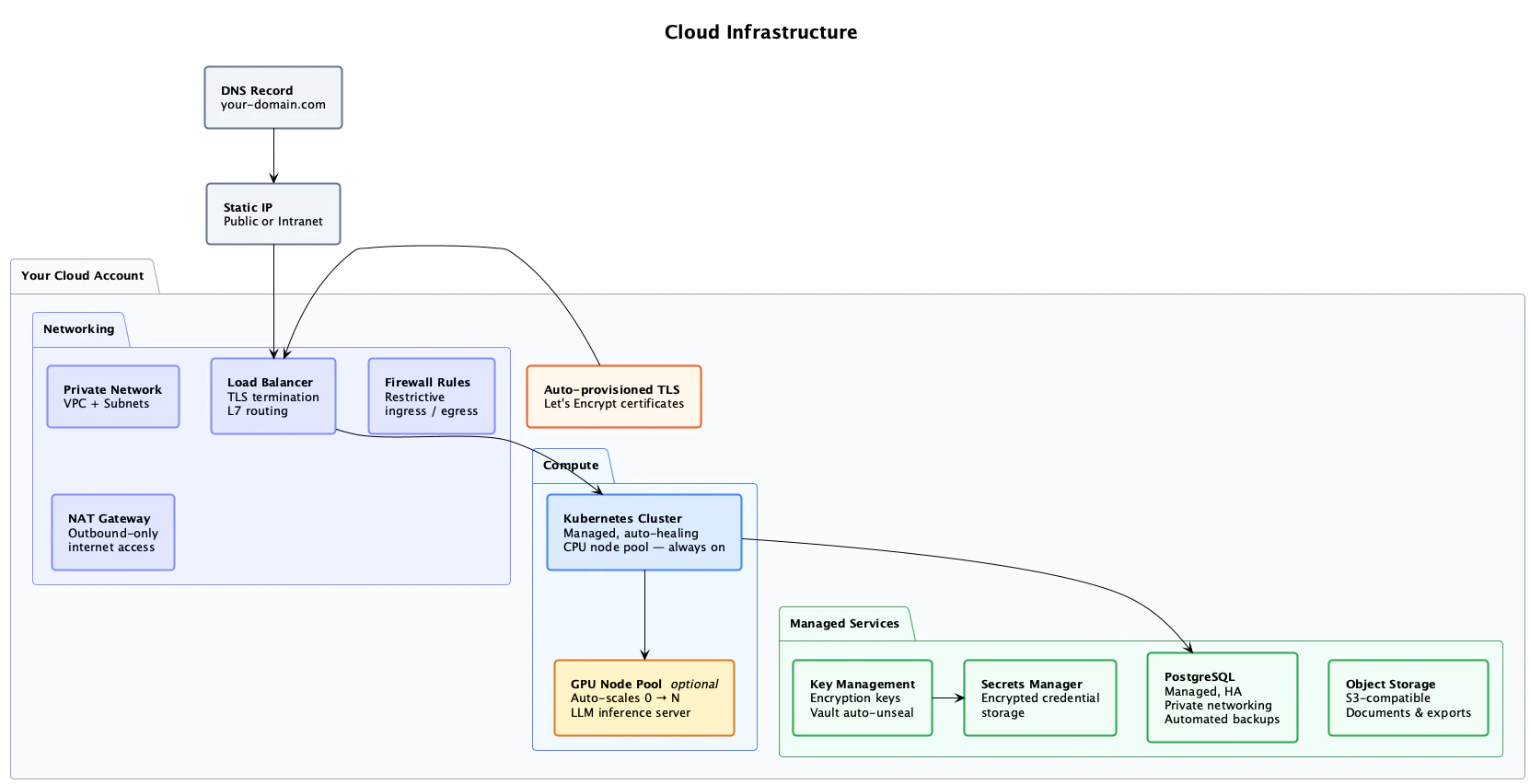
The following cloud resources are provisioned in your account — networking, compute, managed database, encryption, and storage.
### How it works
Operated by MagureLabs, the control plane includes:
* **Management Dashboard** — Configuration and deployment management
* **Provisioning Engine** — Infrastructure-as-Code deployment into your account
* **Health Monitoring** — Outbound-only health reports from your cluster
All application workloads run in your account:
* **Kubernetes Cluster** — Application services, web portals, tool servers
* **Managed Database** — PostgreSQL with HA and automated backups
* **Stateful Services** — Cache, Vector DB, Vault, Object Store
* **GPU Pool** (optional) — LLM inference, auto-scales 0 to N
MagureLabs uses Infrastructure-as-Code to provision resources and receives only outbound health reports. No inbound access to your cluster is required.
***
## Cloud infrastructure
The following cloud resources are provisioned in your account — networking, compute, managed database, encryption, and storage.
 ### Networking
| Resource | Description |
| ------------------------ | ---------------------------------------------------------- |
| **Private Network** | VPC + Subnets — all workloads run in private subnets |
| **Load Balancer** | TLS termination, L7 routing |
| **Firewall Rules** | Restrictive ingress/egress policies |
| **NAT Gateway** | Outbound-only internet access |
| **Auto-provisioned TLS** | Let's Encrypt certificates, automatically managed |
| **DNS Record** | Points your-domain.com to a static IP (public or intranet) |
### Compute
| Resource | Description |
| ---------------------------- | ------------------------------------------------ |
| **Kubernetes Cluster** | Managed, auto-healing, CPU node pool — always on |
| **GPU Node Pool** (optional) | Auto-scales 0 to N for LLM inference |
### Managed services
| Resource | Description |
| ------------------- | --------------------------------------------------------------------- |
| **Key Management** | Cloud-native encryption keys |
| **Secrets Manager** | HashiCorp Vault with KMS auto-unseal for encrypted credential storage |
| **PostgreSQL** | Managed, HA, private networking, automated backups |
| **Object Storage** | S3-compatible storage for documents and exports |
***
## Kubernetes workloads
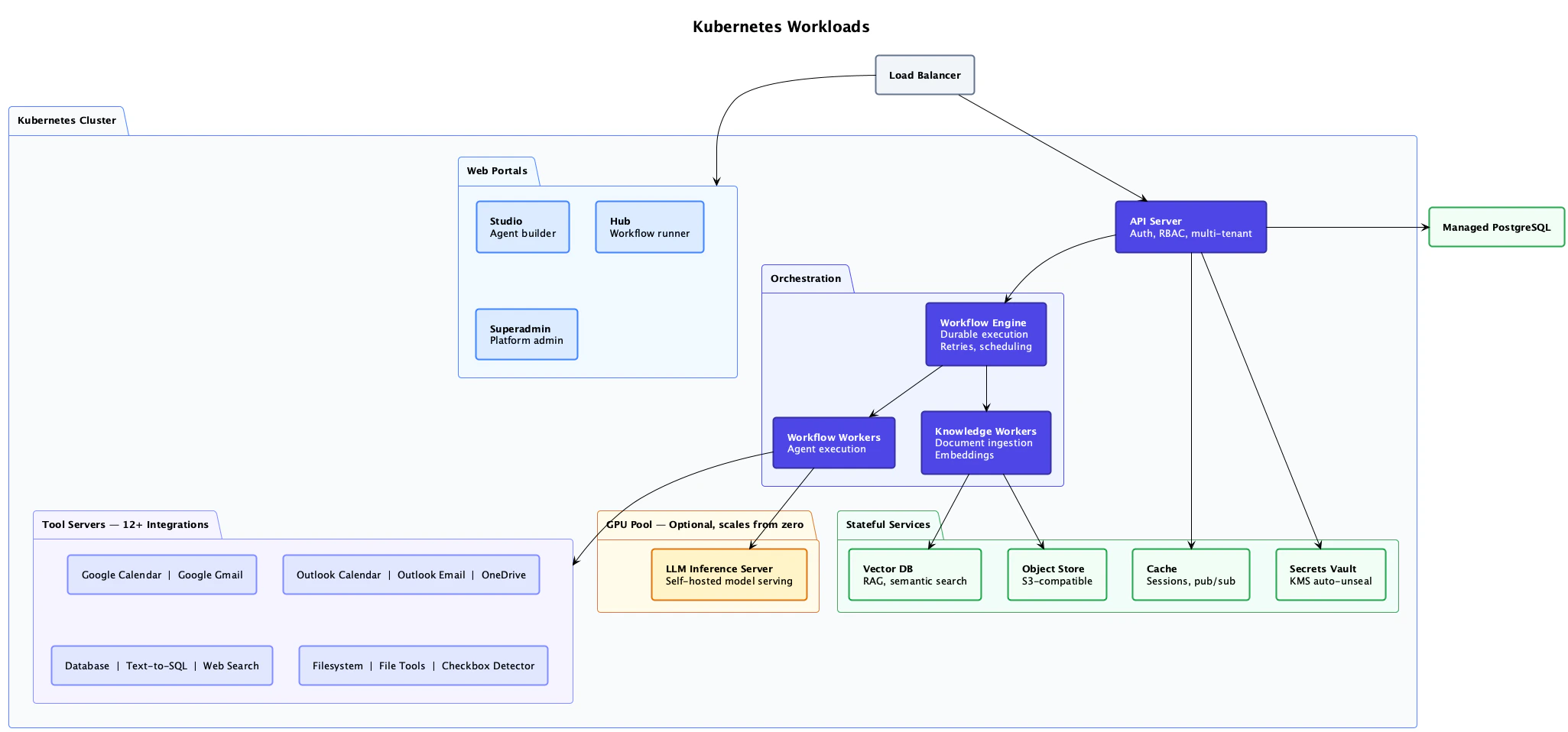
Inside the cluster, these are the services that make up the platform.
### Networking
| Resource | Description |
| ------------------------ | ---------------------------------------------------------- |
| **Private Network** | VPC + Subnets — all workloads run in private subnets |
| **Load Balancer** | TLS termination, L7 routing |
| **Firewall Rules** | Restrictive ingress/egress policies |
| **NAT Gateway** | Outbound-only internet access |
| **Auto-provisioned TLS** | Let's Encrypt certificates, automatically managed |
| **DNS Record** | Points your-domain.com to a static IP (public or intranet) |
### Compute
| Resource | Description |
| ---------------------------- | ------------------------------------------------ |
| **Kubernetes Cluster** | Managed, auto-healing, CPU node pool — always on |
| **GPU Node Pool** (optional) | Auto-scales 0 to N for LLM inference |
### Managed services
| Resource | Description |
| ------------------- | --------------------------------------------------------------------- |
| **Key Management** | Cloud-native encryption keys |
| **Secrets Manager** | HashiCorp Vault with KMS auto-unseal for encrypted credential storage |
| **PostgreSQL** | Managed, HA, private networking, automated backups |
| **Object Storage** | S3-compatible storage for documents and exports |
***
## Kubernetes workloads
Inside the cluster, these are the services that make up the platform.
 ### Web portals
| Service | Description |
| -------------- | ------------------------------------------------------------------------------ |
| **Studio** | Agent builder — design agents, workflows, and tools |
| **Hub** | Workflow runner — end-user interface for running workflows and viewing results |
| **Superadmin** | Platform admin — manage organizations, users, and settings |
### API and orchestration
| Service | Description |
| --------------------- | -------------------------------------------------------------------------------------------------------------- |
| **API Server** | Auth, RBAC, multi-tenant API gateway |
| **Workflow Engine** | Temporal-based durable workflow execution, retries, and scheduling |
| **Workflow Workers** | Agent execution — runs workflow activities |
| **Knowledge Workers** | Document ingestion, chunking, and embedding pipeline |
| **Embedding Service** | Dedicated Text Embeddings Inference (TEI) service serving the dense embedding model for indexing and retrieval |
### Tool servers (12 integrations)
Google Calendar, Google Gmail
Outlook Calendar, Outlook Email, OneDrive
Database, Vanna (Text-to-SQL), CSV-to-SQL, Web Search
Filesystem, File Tools, Checkbox Detector
### Stateful services
| Service | Description |
| ----------------- | --------------------------------------- |
| **Vector DB** | Qdrant — RAG semantic search |
| **Object Store** | S3-compatible document and file storage |
| **Cache** | Redis — sessions, pub/sub |
| **Secrets Vault** | HashiCorp Vault with KMS auto-unseal |
### GPU pool (optional)
| Service | Description |
| ------------------------ | ------------------------------------------- |
| **LLM Inference Server** | Self-hosted model serving, scales from zero |
***
## LLM hosting
MagOneAI offers flexible hosting options tailored to your privacy and cost requirements, with the ability to combine multiple approaches for a hybrid deployment model.
### Web portals
| Service | Description |
| -------------- | ------------------------------------------------------------------------------ |
| **Studio** | Agent builder — design agents, workflows, and tools |
| **Hub** | Workflow runner — end-user interface for running workflows and viewing results |
| **Superadmin** | Platform admin — manage organizations, users, and settings |
### API and orchestration
| Service | Description |
| --------------------- | -------------------------------------------------------------------------------------------------------------- |
| **API Server** | Auth, RBAC, multi-tenant API gateway |
| **Workflow Engine** | Temporal-based durable workflow execution, retries, and scheduling |
| **Workflow Workers** | Agent execution — runs workflow activities |
| **Knowledge Workers** | Document ingestion, chunking, and embedding pipeline |
| **Embedding Service** | Dedicated Text Embeddings Inference (TEI) service serving the dense embedding model for indexing and retrieval |
### Tool servers (12 integrations)
Google Calendar, Google Gmail
Outlook Calendar, Outlook Email, OneDrive
Database, Vanna (Text-to-SQL), CSV-to-SQL, Web Search
Filesystem, File Tools, Checkbox Detector
### Stateful services
| Service | Description |
| ----------------- | --------------------------------------- |
| **Vector DB** | Qdrant — RAG semantic search |
| **Object Store** | S3-compatible document and file storage |
| **Cache** | Redis — sessions, pub/sub |
| **Secrets Vault** | HashiCorp Vault with KMS auto-unseal |
### GPU pool (optional)
| Service | Description |
| ------------------------ | ------------------------------------------- |
| **LLM Inference Server** | Self-hosted model serving, scales from zero |
***
## LLM hosting
MagOneAI offers flexible hosting options tailored to your privacy and cost requirements, with the ability to combine multiple approaches for a hybrid deployment model.
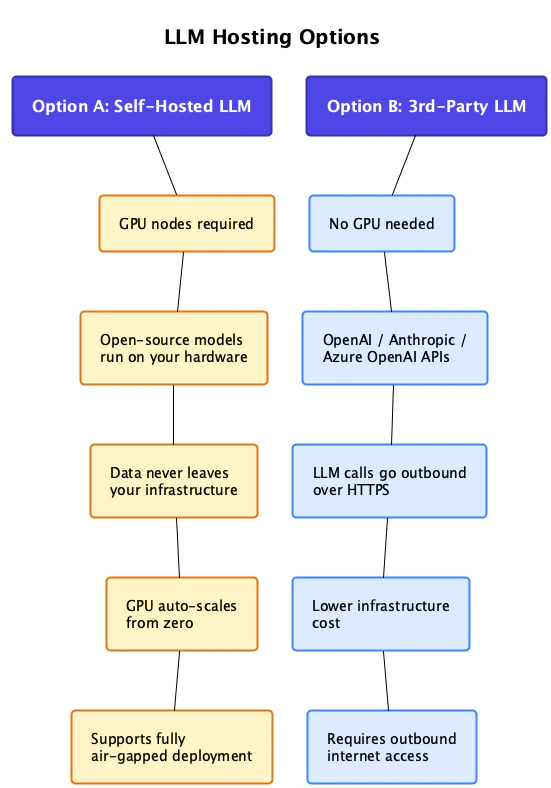 Run open-source models on your own GPU hardware. Data never leaves your infrastructure.
| | |
| ---------------- | -------------------------------------------------------------- |
| **GPU nodes** | Required |
| **Models** | Open-source (Llama, Mistral, etc.) run on your hardware |
| **Data privacy** | Data never leaves your infrastructure |
| **Scaling** | GPU auto-scales from zero |
| **Air-gapped** | Supports fully air-gapped deployment with zero internet access |
Use cloud LLM providers via their APIs. Lower infrastructure cost, no GPU needed.
| | |
| ------------- | ---------------------------------------- |
| **GPU nodes** | Not needed |
| **Providers** | OpenAI, Anthropic, Azure OpenAI APIs |
| **Data flow** | LLM calls go outbound over HTTPS |
| **Scaling** | Handled by the provider |
| **Cost** | Lower infrastructure cost, pay-per-token |
Self-hosted LLM deployments enable fully air-gapped operations with zero internet dependency, supporting both public and internal/intranet entry points to align with your network security requirements.
***
## Network security
All infrastructure is designed with defense-in-depth security principles.
Run open-source models on your own GPU hardware. Data never leaves your infrastructure.
| | |
| ---------------- | -------------------------------------------------------------- |
| **GPU nodes** | Required |
| **Models** | Open-source (Llama, Mistral, etc.) run on your hardware |
| **Data privacy** | Data never leaves your infrastructure |
| **Scaling** | GPU auto-scales from zero |
| **Air-gapped** | Supports fully air-gapped deployment with zero internet access |
Use cloud LLM providers via their APIs. Lower infrastructure cost, no GPU needed.
| | |
| ------------- | ---------------------------------------- |
| **GPU nodes** | Not needed |
| **Providers** | OpenAI, Anthropic, Azure OpenAI APIs |
| **Data flow** | LLM calls go outbound over HTTPS |
| **Scaling** | Handled by the provider |
| **Cost** | Lower infrastructure cost, pay-per-token |
Self-hosted LLM deployments enable fully air-gapped operations with zero internet dependency, supporting both public and internal/intranet entry points to align with your network security requirements.
***
## Network security
All infrastructure is designed with defense-in-depth security principles.
 ### Security guarantees
All infrastructure nodes operate within private subnets without public IP addresses, ensuring network isolation
System maintains outbound-only communication protocols, preventing any inbound access or data push to your cluster environment
Data protection includes encryption at rest through cloud-native key management services and automatic TLS encryption for all data in transit
Entry point configuration supports both public IP and internal/intranet IP options, allowing you to define access based on your specific security requirements
Self-hosted LLM configurations enable completely isolated deployments with zero internet connectivity for maximum security compliance
The platform implements outbound-only connectivity patterns, ensuring no external systems can initiate connections to your infrastructure
### Network architecture
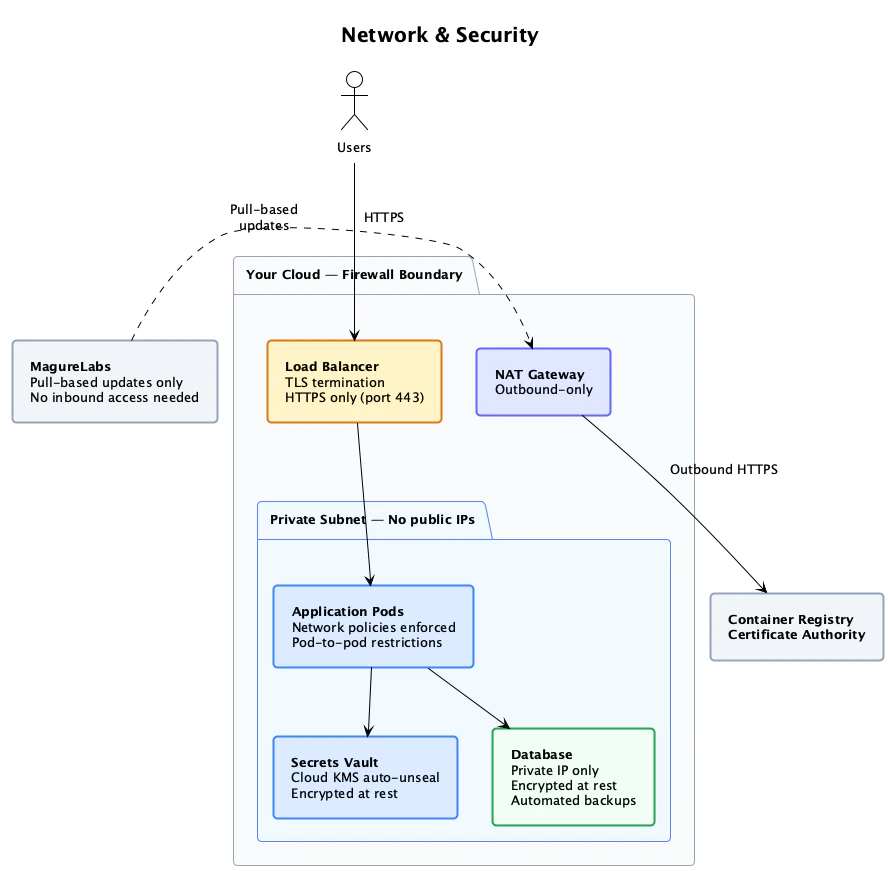
Traffic flow through the infrastructure:
Users access the platform through the load balancer. HTTPS only (port 443) with TLS termination.
The load balancer sits inside your cloud firewall boundary and routes to the Kubernetes cluster.
Application pods run in a private subnet with no public IPs. Network policies enforce pod-to-pod restrictions.
Outbound HTTPS traffic (e.g., 3rd-party LLM API calls) routes through the NAT Gateway. No inbound connections from the internet reach the pods directly.
MagureLabs delivers updates via pull-based mechanisms. No inbound access to your cluster is needed.
### Internal service security
| Component | Security measures |
| ---------------------- | ----------------------------------------------------- |
| **Application Pods** | Network policies enforced, pod-to-pod restrictions |
| **Secrets Vault** | Cloud KMS auto-unseal, encrypted at rest |
| **Database** | Private IP only, encrypted at rest, automated backups |
| **Container Registry** | Private registry with certificate authority |
***
## Deployment prerequisites
To deploy MagOneAI Enterprise Edition, we need the following from your team:
| Requirement | Details |
| ------------------------------------------ | ---------------------------------------------------------------------------- |
| **Cloud account access** | Credentials to provision: K8s cluster, database, networking, encryption keys |
| **Domain + DNS** | A subdomain and ability to create an A record |
| **GPU quota** *(only if self-hosting LLM)* | We provide exact quota details based on your model selection |
MagureLabs handles the entire provisioning and deployment process. Your team provides cloud account access and a domain — we take care of the rest.
***
## Next steps
Deep dive into MagOneAI's security architecture
How Vault manages API keys, OAuth tokens, and credentials
Configure self-hosted LLM inference
Multi-tenant organizational structure
### Security guarantees
All infrastructure nodes operate within private subnets without public IP addresses, ensuring network isolation
System maintains outbound-only communication protocols, preventing any inbound access or data push to your cluster environment
Data protection includes encryption at rest through cloud-native key management services and automatic TLS encryption for all data in transit
Entry point configuration supports both public IP and internal/intranet IP options, allowing you to define access based on your specific security requirements
Self-hosted LLM configurations enable completely isolated deployments with zero internet connectivity for maximum security compliance
The platform implements outbound-only connectivity patterns, ensuring no external systems can initiate connections to your infrastructure
### Network architecture
Traffic flow through the infrastructure:
Users access the platform through the load balancer. HTTPS only (port 443) with TLS termination.
The load balancer sits inside your cloud firewall boundary and routes to the Kubernetes cluster.
Application pods run in a private subnet with no public IPs. Network policies enforce pod-to-pod restrictions.
Outbound HTTPS traffic (e.g., 3rd-party LLM API calls) routes through the NAT Gateway. No inbound connections from the internet reach the pods directly.
MagureLabs delivers updates via pull-based mechanisms. No inbound access to your cluster is needed.
### Internal service security
| Component | Security measures |
| ---------------------- | ----------------------------------------------------- |
| **Application Pods** | Network policies enforced, pod-to-pod restrictions |
| **Secrets Vault** | Cloud KMS auto-unseal, encrypted at rest |
| **Database** | Private IP only, encrypted at rest, automated backups |
| **Container Registry** | Private registry with certificate authority |
***
## Deployment prerequisites
To deploy MagOneAI Enterprise Edition, we need the following from your team:
| Requirement | Details |
| ------------------------------------------ | ---------------------------------------------------------------------------- |
| **Cloud account access** | Credentials to provision: K8s cluster, database, networking, encryption keys |
| **Domain + DNS** | A subdomain and ability to create an A record |
| **GPU quota** *(only if self-hosting LLM)* | We provide exact quota details based on your model selection |
MagureLabs handles the entire provisioning and deployment process. Your team provides cloud account access and a domain — we take care of the rest.
***
## Next steps
Deep dive into MagOneAI's security architecture
How Vault manages API keys, OAuth tokens, and credentials
Configure self-hosted LLM inference
Multi-tenant organizational structure