

Crawling websites into a knowledge base
Add a website to a knowledge base, control how far the crawl goes, and keep it fresh on a schedule
Overview
Add URL crawls a website and adds it to a knowledge base. MagOneAI walks same-domain links from the URL you give it, collects each page as text, and stores the whole crawl as one document in the knowledge base.
One Add URL action creates one row in the document list, not one row per page. Page boundaries are preserved inside the document, so a citation still points at the page it came from.
You can also give that document a schedule, so the site is re-crawled on a cadence and the knowledge base stays current without anyone remembering to refresh it.
Adding a URL
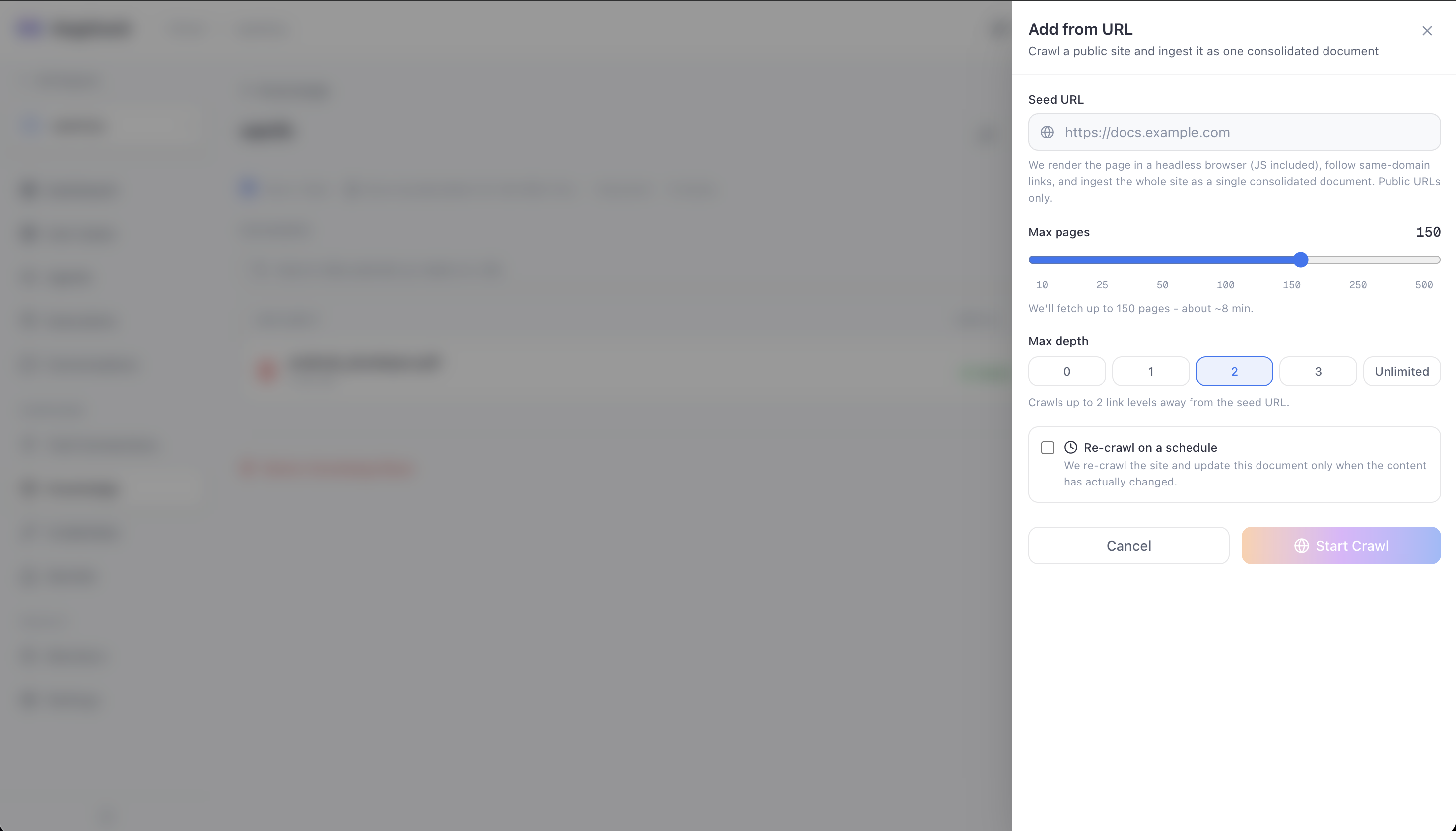
Open the knowledge base and click Add URL
The Add from URL panel opens. Everything the crawl needs is on this one panel, including the schedule, so a recurring crawl is set up in a single pass.
Enter the seed URL
Seed URL is the page the crawl starts from. MagOneAI renders it in a headless browser, so a site that builds its content with script is still read correctly.
Public URLs only. See What is crawled, and what is refused.
Set the page budget
Max pages caps the total number of pages the crawl fetches. The slider snaps to 10, 25, 50, 100, 150, 250 and 500, and starts at 150.
The panel shows an estimated run time under the slider, at roughly three seconds per page. The low stops are there so you can test a crawl on a small site before you commit to a large cap.
Set the depth
Max depth is how many links away from the seed the crawl may travel. The panel offers five choices, and starts at 2.
| Depth | Crawls |
|---|---|
0 | The seed page only |
1 | The seed, and every same-domain page it links to |
2 | The above, plus pages those link to |
3 | One level further again |
| Unlimited | Every same-domain link, until the page budget runs out |
The default of 2 reaches a site's main content without spending the page budget on deep or archived pages.
Add a schedule, if you want one
Tick Re-crawl on a schedule to keep the document current. See Scheduling a recurring crawl.
Click Start Crawl
The crawl runs in the background and the document appears as processing. Crawling never happens inside the request, so a large site does not hold a request open.
The API accepts a wider range than the panel offers: up to 500 pages and a depth of up to 10. A value above either ceiling is clamped down rather than refused.
Depth and the page budget work together
The crawl walks breadth first, so it finishes everything at one depth before going deeper.
That matters because the two limits interact. With a budget of 150 pages and unlimited depth on a large site, the budget is spent near the seed rather than following one deep chain of low-value pages. Setting a depth as well is how you say "the documentation section, not the whole site".
Start with a low depth and a small page budget, look at what arrived, then widen. A depth of 1 on a documentation index page is often all you need, and it finishes in a fraction of the time.
What is crawled, and what is refused
| Rule | Behaviour |
|---|---|
| Links followed | Same domain as the seed only |
| Scheme | HTTPS only by default |
| Addresses | Only publicly routable ones. Private and internal addresses, and cloud metadata hostnames, are refused. |
| Redirects | The final URL is re-checked after every redirect |
| Error pages | A page returning 400 or above is skipped |
| Bot protection | Detected and skipped rather than stored as content |
| Page size | Capped, 10 MB by default |
| Politeness | A short delay between pages, 0.5 seconds by default |
The crawler identifies itself and respects the page budget, but a scheduled crawl sends unattended traffic to someone else's site. Point it at sites you own or are permitted to crawl, and keep the cadence modest.
Crawling is refused for private and internal addresses. This is deliberately stricter than other parts of MagOneAI, because a crawler takes a URL from a user rather than from an administrator.
Refreshing a crawled document
Each crawled document has a refresh control that re-crawls the same URL end to end, reusing the page and depth settings it was created with.
The refresh is content-aware:
- If the new content is identical, the existing vectors are left in place. Nothing is re-embedded.
- If it changed, the old vectors are removed and the new content is indexed.
Re-adding a URL whose crawl failed reuses the existing row rather than creating a second one, so a retry does not leave two entries for the same site.
Scheduling a recurring crawl
Tick Re-crawl on a schedule on the Add from URL panel, and the document is re-crawled on the cadence you pick.
Pick a frequency
Three presets cover most cases:
| Preset | Runs |
|---|---|
| Hourly | At the top of every hour |
| Daily | Once a day at 3am |
| Weekly | Every Monday at 3am |
Choose Custom for anything else.
Write a cron expression, for a custom cadence
Standard five-field cron: minute, hour, day, month, weekday. For example 0 3 * * 1 for 03:00 every Monday.
Set the timezone
The cadence is read in the timezone you pick, so "3am" means local business hours rather than UTC.
Save
The document shows its schedule and its next run time. The next run time is calculated by the server, because the cron is evaluated in the timezone you chose.
The same panel reopens as Edit crawl settings on a document that already has a schedule, so the page cap, the depth and the cadence are all changed in one place.
The minimum interval is one hour
A cadence with any gap shorter than an hour is refused, not quietly slowed down.
Refusing rather than clamping is deliberate. Someone who asked for every five minutes and silently got hourly would have no way to tell. The error states the floor.
The floor exists because a crawl is much heavier than an ordinary workflow: fetching the pages is one long job, and each finished crawl then triggers a full extract, chunk, embed and index pass on the same worker pool.
Note that the floor applies to the shortest gap in the pattern, not the average. An expression like 0,5 * * * * runs twice an hour but with a five-minute gap, so it is refused.
Limits
| Limit | Default |
|---|---|
| Minimum gap between runs | 1 hour |
| Documents with a schedule, per project | 25 |
| Scheduled crawls started per sweep | 10 |
Scheduled crawls are checked every 15 minutes, and the ones due longest are started first. If more are due than one sweep will start, the rest are picked up by the next sweep rather than dropped.
Pausing and removing a schedule
Tick Pause for now on the schedule to stop the runs without losing the configuration, and untick it later to resume. Clearing Re-crawl on a schedule leaves the document and its content in place; only the cadence goes.
Troubleshooting
Causes to check:
- Max depth is 0, which means the seed page only.
- The seed page's links point at a different domain. Only same-domain links are followed.
- The links are rendered by script in a way the crawler did not see as links.
Causes to check: the site has fewer same-domain pages within the depth you set, pages returned errors, or bot protection blocked them. The crawl stops when it runs out of eligible pages, not only when the budget is spent.
Causes to check: it is HTTP rather than HTTPS, or it resolves to a private, internal or cloud-metadata address. Both are refused before the crawl starts.
Cause: You should be able to. Re-adding a failed URL reuses the existing row.
If you get a conflict instead, a crawl of that URL is genuinely running right now. Wait for it to settle.
Two different causes, and the message tells you which one:
| Message | Cause |
|---|---|
Invalid cron expression | The expression is malformed. A cron has five fields separated by spaces: minute, hour, day, month, weekday. |
This schedule runs every N minutes, which is too frequent for a site crawl | Some gap in the pattern is under an hour. |
Fix for the second one: widen the shortest gap, not the number of runs per day. MagOneAI walks the next several runs and measures the gap between each consecutive pair, so one short gap refuses the whole expression.
0,5 * * * * is the usual surprise. It runs only twice an hour, but the two runs are five minutes apart, so it is refused.
Cause: The project is at its limit of 25 scheduled documents.
Fix: Remove a schedule you no longer need, or widen the cadence on an existing one and refresh the others by hand.
Cause: The platform-wide sweeper that starts scheduled crawls is not running, so nothing is advancing the next run time.
Fix: This is an operator issue rather than a configuration one. Report it. To stop a crawl deliberately, pause the individual document's schedule instead.
Causes to check: the schedule has not fired yet, or the crawl found byte-identical content and left the existing vectors in place. Use the refresh control to force a re-crawl now.