

Introduction
MagOneAI is the enterprise agentic AI workflow platform built for AI sovereignty. Deploy on your infrastructure, connect any LLM, and run production-grade AI workflows with enterprise security from day one.
What is MagOneAI?
MagOneAI is an enterprise agentic AI workflow platform that deploys on your infrastructure and gives you complete control over your AI stack — the models you use, the data you process, and the workflows you run.
Subscribe to the platform. Deploy it privately. Connect any LLM — from OpenAI and Anthropic to privately hosted open-source models. Your data never leaves your environment.
AI sovereignty
Deploy on your infrastructure. Run private LLMs. No data leaves your environment. Meet the strictest compliance and data residency requirements.
Any model, any provider
OpenAI, Anthropic, or any privately deployed model that supports the OpenAI-compatible API format. Switch models without changing a single workflow.
Production-grade from day one
Temporal for durable execution. HashiCorp Vault for secrets. OAuth 2.0 for integrations. RBAC and audit trails built in — not bolted on.
See it in action
Build complex, multi-agent AI workflows visually — with parallel execution, conditional logic, human-in-the-loop approvals, and private model support.
A Know Your Business (KYB) workflow that processes Emirates ID, trade licenses, and passports in parallel using a privately hosted Qwen3 vision model — sensitive document data never leaves your infrastructure.
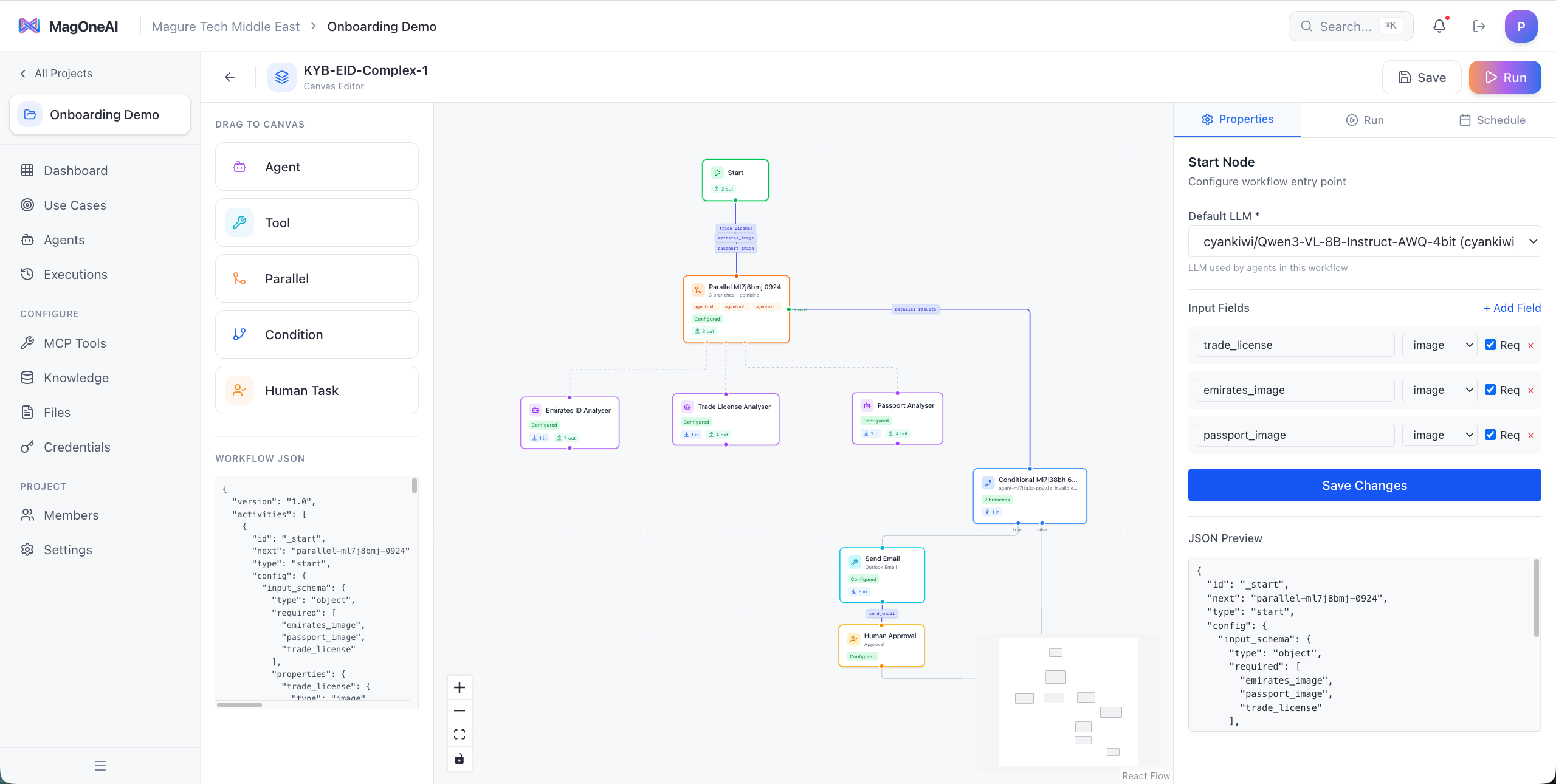
What you see in the canvas:
- Drag-and-drop nodes — Agent, Tool, Parallel, Condition, and Human Task
- Parallel execution — run multiple AI agents simultaneously and combine their outputs
- Conditional logic — route workflows based on agent outputs or business rules
- Human-in-the-loop — require human approval before critical actions like sending emails
- Any model per workflow — use a private vision model for document analysis, a cloud model for text generation
- JSON + visual — every workflow is both a visual canvas and a portable JSON definition
Platform architecture
MagOneAI is a layered enterprise platform — from the consumption interfaces your teams use, through the AI and workflow engine, down to your enterprise data sources.
Web interface, mobile apps, API/SDK integrations, and dashboard embeds. Your teams interact with AI through the channel that fits their workflow.
SSO (OIDC) and OAuth for enterprise identity. RBAC and permissions at every level. API key management for programmatic access. Data encryption at rest and in transit.
Dialogue management for natural conversations. Multi-agent orchestration for complex tasks. Human-in-the-loop for approval workflows. This is where your AI agents reason, plan, and execute.
Standard tools (Calendar, Email, Search), database and SQL tools, custom integrations, and external APIs — all connected through the Model Context Protocol. Agents access tools with managed OAuth and credential handling.
Design Studio for visual workflow building. Custom RAG pipelines for knowledge-intensive tasks. Complex multi-model orchestration across agents. All running on Temporal for durable, crash-resistant execution.
LLMs (cloud and private), machine learning models, and specialized models — all configurable per organization, per project, per agent. Route to the right model for the right task.
Action logging, model usage tracking, cost tracking, policy administration, usage statistics, and performance analysis. Full visibility into every AI action across your organization.
Connect to data warehouses and lakes, documents and files, knowledge bases, and external APIs and web services. Your agents work with your data, wherever it lives.
AI sovereignty
Most enterprise AI platforms force a choice: use cloud-hosted AI APIs and accept data leaving your perimeter, or spend months building infrastructure from scratch. MagOneAI eliminates that trade-off.
Private deployment
MagOneAI runs entirely within your infrastructure — AWS, Azure, GCP, or your own data center. Docker Compose for development, Kubernetes for production. Nothing phones home.
Private LLMs
Run open-source models like Llama, Mistral, Qwen, or DeepSeek on your own GPU infrastructure. Any model that exposes an OpenAI-compatible API endpoint works out of the box — vLLM, Ollama, LM Studio, TGI, or any custom deployment.
True AI sovereignty means your prompts, your data, and your model responses never cross your network boundary. The KYB workflow above demonstrates this — sensitive identity documents are processed by a privately hosted Qwen3 vision model, entirely within the enterprise perimeter.
Connect any model
MagOneAI is model-agnostic. You configure which LLM providers and models are available at the organization level, and agents use them through a unified interface.
| Provider type | Examples | How it connects |
|---|---|---|
| Cloud AI APIs | OpenAI GPT-4o, Anthropic Claude, Google Gemini | Direct API integration with native function calling |
| Privately hosted models | Llama, Mistral, Qwen, DeepSeek, Phi | Any endpoint supporting OpenAI-compatible API format |
| Managed private AI | Azure OpenAI (OpenAI-compatible) | Same OpenAI-compatible integration |
You can use different models for different agents within the same workflow. A fast, small model for classification. A large reasoning model for analysis. A private vision model for document processing. MagOneAI handles the routing.
Analytics and monitoring
Track every workflow execution with real-time analytics — success rates, durations, failure patterns, and activity-level performance. Identify bottlenecks, audit agent behavior, and optimize workflows with data.
Organization-wide dashboard showing execution trends, success rates, average durations, and failure tracking across all workflows.
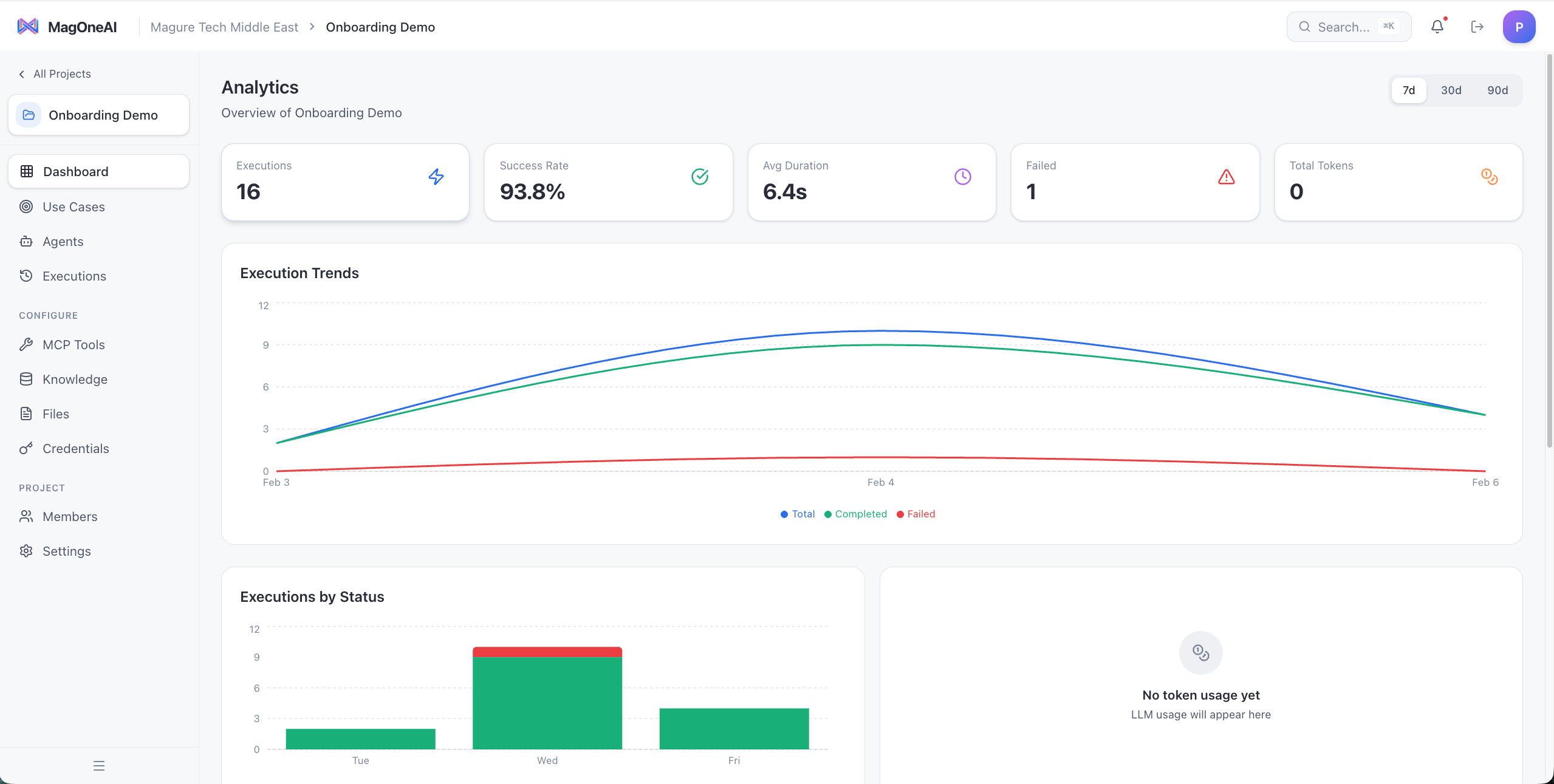
What you can track:
- Execution metrics — total runs, success rates, average durations, failure counts
- Trend analysis — execution patterns over 7, 30, or 90 day windows
- Activity performance — per-step success rates and timing to identify bottlenecks
- Trigger breakdown — understand how workflows are initiated (API, schedule, manual)
- Token usage — track LLM consumption for cost management and optimization
Platform overview
MagOneAI is organized into three portals, each serving a different role in your organization:
Admin Portal
For IT and platform teams
Manage organizations, users, LLM provider configurations, security policies, and resource quotas. Govern who can use what, across the entire platform.
MagOneAI Studio
For business teams and developers
Create AI agents with personas and tools. Build multi-step workflows with a visual canvas. Connect to external systems via MCP. Test and deploy — without writing infrastructure code.
MagOneAI Hub
For end users
Chat with AI assistants. Run workflows. Track execution progress in real time. Review conversation history. No training required — just type.
How it works
MagOneAI follows a structured autonomy architecture: you define the workflow structure for predictability and compliance, AI handles the reasoning and intelligence at each step.
Define your workflow
Use the visual workflow builder to define the structure — triggers, parallel branches, agent steps, conditional logic, and human approval gates. The structure is deterministic and auditable.
Configure AI agents
Configure agents with personas, tools, and LLM settings. Assign specific models and permissions to each agent.
Connect your tools
Use MCP (Model Context Protocol) to connect agents to Google Calendar, Gmail, Outlook, Web Search, databases, CRMs, or any custom API. OAuth flows are handled automatically.
Deploy to production
Every workflow runs on Temporal — the same durable execution engine used by Uber, Netflix, and Stripe. Workflows survive server crashes, network failures, and can run for hours or days without losing state.
Platform capabilities
| Area | What you get |
|---|---|
| LLM support | OpenAI, Anthropic, and any OpenAI-compatible API endpoint — including privately hosted models |
| Agent types | Simple, LLM, RAG, Tool, and Full agents with native function calling |
| Workflow engine | Temporal-powered durable execution with automatic retries, timeouts, and crash recovery |
| Workflow nodes | Agent, Tool, Parallel, Condition, and Human Task — composable building blocks |
| Tool integration | MCP (Model Context Protocol) with pre-built connectors for Google, Microsoft, web, and databases |
| Security | HashiCorp Vault for secrets, SSO (OIDC) and OAuth, encryption at rest and in transit |
| Governance | RBAC (Superadmin; org Owner/Admin/Member; project Admin/Builder/Operator/Viewer), full audit trails, org-level isolation |
| Monitoring | Execution analytics, activity-level performance, cost tracking, usage statistics |
| Knowledge base | Qdrant-powered vector search for RAG — give agents access to your documents and data |
| Deployment | Docker Compose for dev, Kubernetes for production. Runs on any cloud or on-premise |