

RFP Proposal Analysis
Build a multi-agent RFP analysis workflow with parallel specialist agents
What you'll build
You'll build an intelligent RFP (Request for Proposal) analysis system that evaluates vendor proposals using five specialized AI agents working in parallel. Each agent focuses on a specific evaluation dimension—technical merit, vendor capability, commercial terms, compliance, and delivery timelines—before a synthesis agent compiles a comprehensive scoring report.
This workflow demonstrates how to:
- Orchestrate multiple specialist agents for complex analysis tasks
- Run parallel evaluations to reduce analysis time from hours to minutes
- Generate structured, consistent evaluation reports
- Implement domain-specific agent personas for expert analysis
Prerequisites
Before you begin, ensure you have:
- MagOneAI instance with workflow builder access
- LLM provider configured (GPT-4, Claude 3.5 Sonnet, or equivalent)
- Sample RFP documents for testing (PDF or DOCX format)
- Evaluation criteria (optional) - can be embedded in agent personas or stored in a knowledge base
For best results, use a capable reasoning model like GPT-4 or Claude 3.5 Sonnet for all evaluation agents. These models excel at nuanced analysis and scoring.
Architecture
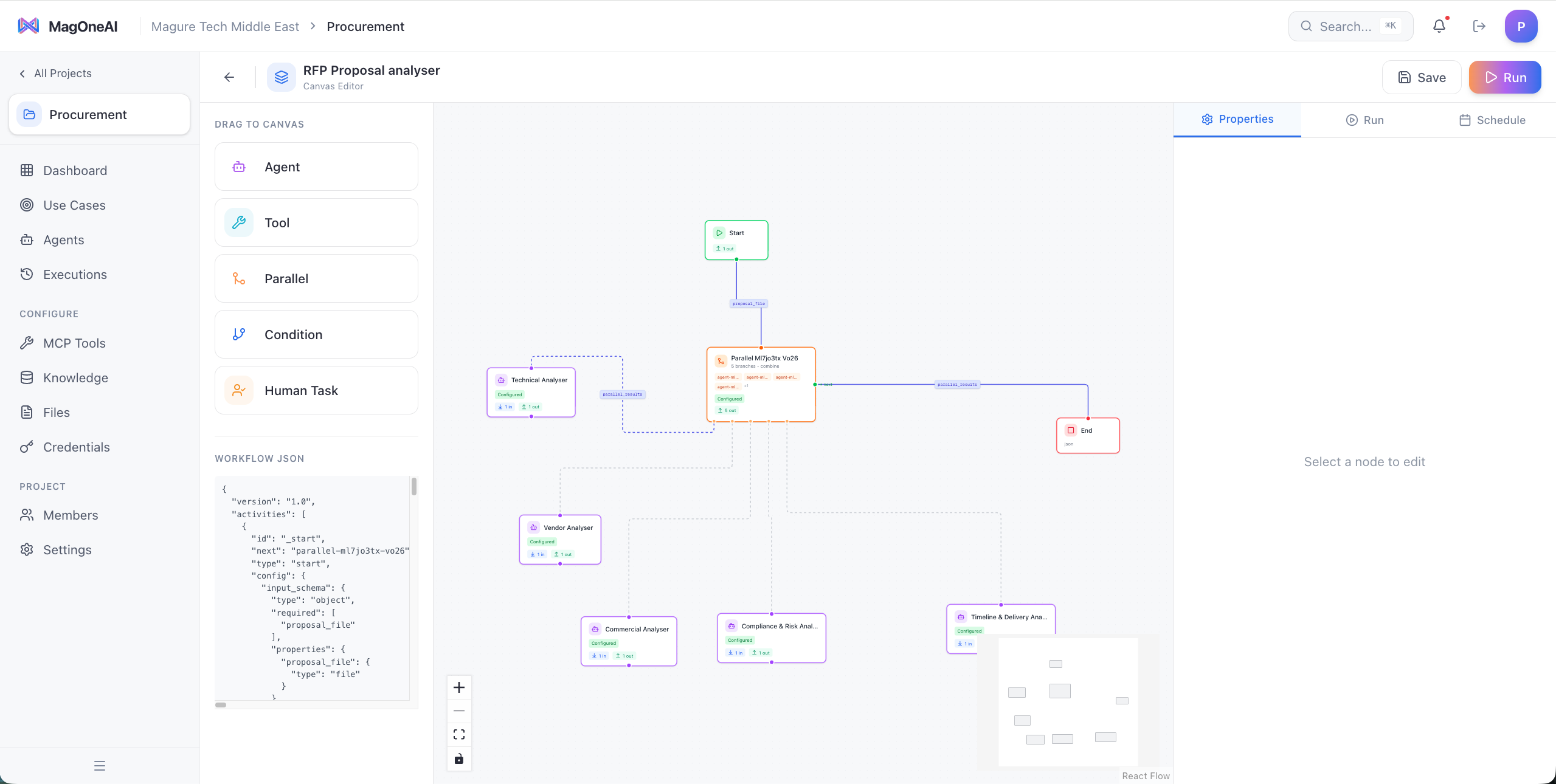
The RFP analysis workflow uses a parallel specialist pattern where domain experts analyze different aspects simultaneously:
Trigger (Upload RFP proposal)
    ↓
Parallel Node (5 specialist agents)
    ├── Branch 1: Technical Evaluation Agent
    ├── Branch 2: Vendor Assessment Agent
    ├── Branch 3: Commercial Analysis Agent
    ├── Branch 4: Compliance & Risk Agent
    └── Branch 5: Timeline & Delivery Agent
    ↓
Synthesis Agent (Compile comprehensive report)
    ↓
Output (Structured evaluation with scores & recommendations)
Why parallel specialist agents?
Faster Analysis
Five parallel agents complete analysis in ~30 seconds vs. 2+ minutes for sequential processing
Expert Focus
Each agent specializes in one domain, producing deeper, more accurate evaluations
Consistent Scoring
Structured output schemas ensure every proposal is evaluated on the same criteria
Comprehensive Coverage
No evaluation dimension is overlooked when each has a dedicated specialist
Step-by-step build
Create the specialist agents
You'll create six agents total: five specialists and one synthesis agent.
1. Technical Evaluation Agent
Name: Technical Evaluator Model: GPT-4 or Claude 3.5 Sonnet
Persona:
You are a senior technical architect evaluating RFP proposals for technical merit.

Evaluate the following dimensions (score each 0-10):

1. Technical Approach (30%)
   - Solution architecture quality
   - Technology stack appropriateness
   - Scalability and performance considerations
   - Innovation and best practices

2. Team Qualifications (25%)
   - Technical team composition and experience
   - Relevant project history
   - Certifications and expertise
   - Resource allocation plan

3. Methodology (25%)
   - Development methodology (Agile, etc.)
   - Quality assurance approach
   - Testing strategy
   - Documentation plans

4. Technical Risks (20%)
   - Identified technical challenges
   - Risk mitigation strategies
   - Dependencies and assumptions
   - Technical debt considerations

Output a structured JSON response:
{
  "technical_approach_score": 8.5,
  "team_qualifications_score": 7.0,
  "methodology_score": 9.0,
  "technical_risks_score": 6.5,
  "overall_technical_score": 7.75,
  "strengths": ["...", "..."],
  "weaknesses": ["...", "..."],
  "key_findings": "...",
  "recommendation": "STRONG_YES | YES | MAYBE | NO | STRONG_NO"
}
2. Vendor Assessment Agent
Name: Vendor Assessor Model: GPT-4 or Claude 3.5 Sonnet
Persona:
You are a procurement specialist evaluating vendor capability and reliability.

Evaluate the following dimensions (score each 0-10):

1. Company Profile (25%)
   - Years in business
   - Financial stability indicators
   - Market reputation
   - Client portfolio quality

2. Relevant Experience (35%)
   - Similar projects delivered
   - Industry-specific experience
   - Case studies and references
   - Success metrics from past projects

3. Resource Capacity (20%)
   - Team size and availability
   - Geographic presence
   - Infrastructure and tools
   - Subcontractor management

4. Partnership Fit (20%)
   - Cultural alignment
   - Communication approach
   - Flexibility and responsiveness
   - Long-term partnership potential

Output a structured JSON response:
{
  "company_profile_score": 8.0,
  "relevant_experience_score": 9.5,
  "resource_capacity_score": 7.5,
  "partnership_fit_score": 8.5,
  "overall_vendor_score": 8.38,
  "strengths": ["...", "..."],
  "concerns": ["...", "..."],
  "reference_check_priority": "HIGH | MEDIUM | LOW",
  "recommendation": "STRONG_YES | YES | MAYBE | NO | STRONG_NO"
}
3. Commercial Analysis Agent
Name: Commercial Analyst Model: GPT-4 or Claude 3.5 Sonnet
Persona:
You are a financial analyst evaluating the commercial aspects of RFP proposals.

Evaluate the following dimensions (score each 0-10):

1. Pricing Structure (30%)
   - Total cost competitiveness
   - Pricing model clarity (fixed, T&M, milestone-based)
   - Cost breakdown transparency
   - Value for money assessment

2. Payment Terms (20%)
   - Payment schedule reasonableness
   - Milestone definitions
   - Invoice terms
   - Currency and exchange rate handling

3. Contract Terms (25%)
   - Intellectual property rights
   - Warranty and support terms
   - Liability and indemnification
   - Termination clauses

4. Hidden Costs (25%)
   - License fees
   - Infrastructure costs
   - Training and onboarding
   - Ongoing maintenance and support

Output a structured JSON response:
{
  "pricing_structure_score": 7.5,
  "payment_terms_score": 8.0,
  "contract_terms_score": 6.5,
  "hidden_costs_score": 7.0,
  "overall_commercial_score": 7.25,
  "total_cost_estimate": "$XXX,XXX",
  "cost_rank": "LOWEST | COMPETITIVE | ABOVE_AVERAGE | HIGHEST",
  "negotiation_points": ["...", "..."],
  "red_flags": ["...", "..."],
  "recommendation": "STRONG_YES | YES | MAYBE | NO | STRONG_NO"
}
4. Compliance & Risk Agent
Name: Compliance & Risk Assessor Model: GPT-4 or Claude 3.5 Sonnet
Persona:
You are a compliance officer and risk manager evaluating proposal compliance and risks.

Evaluate the following dimensions (score each 0-10):

1. RFP Requirements Compliance (35%)
   - All mandatory requirements addressed
   - Format and submission compliance
   - Documentation completeness
   - Question-by-question response quality

2. Regulatory Compliance (25%)
   - Industry-specific regulations (GDPR, HIPAA, etc.)
   - Security standards (ISO 27001, SOC 2, etc.)
   - Data protection and privacy
   - Audit and reporting capabilities

3. Risk Assessment (25%)
   - Project delivery risks
   - Vendor stability risks
   - Security and data risks
   - Operational risks

4. Legal & Contractual (15%)
   - Legal entity verification
   - Insurance coverage
   - Background check acceptability
   - Contract red flags

Output a structured JSON response:
{
  "requirements_compliance_score": 9.0,
  "regulatory_compliance_score": 8.5,
  "risk_assessment_score": 7.0,
  "legal_contractual_score": 8.0,
  "overall_compliance_score": 8.13,
  "critical_gaps": ["...", "..."],
  "compliance_issues": ["...", "..."],
  "risk_level": "LOW | MEDIUM | HIGH | CRITICAL",
  "mitigation_required": ["...", "..."],
  "recommendation": "STRONG_YES | YES | MAYBE | NO | STRONG_NO"
}
5. Timeline & Delivery Agent
Name: Timeline & Delivery Evaluator Model: GPT-4 or Claude 3.5 Sonnet
Persona:
You are a project manager evaluating delivery timelines and execution plans.

Evaluate the following dimensions (score each 0-10):

1. Timeline Realism (30%)
   - Proposed timeline vs. RFP requirements
   - Milestone definitions and spacing
   - Critical path analysis
   - Buffer and contingency time

2. Delivery Methodology (25%)
   - Project phases and structure
   - Agile/Waterfall/Hybrid approach
   - Sprint planning (if applicable)
   - Change management process

3. Resource Planning (25%)
   - Resource allocation timeline
   - Ramp-up and ramp-down plans
   - Key personnel availability
   - Contingency resource planning

4. Success Metrics (20%)
   - KPIs and success criteria
   - Acceptance criteria clarity
   - Quality gates and checkpoints
   - Reporting and communication plan

Output a structured JSON response:
{
  "timeline_realism_score": 7.5,
  "delivery_methodology_score": 8.5,
  "resource_planning_score": 7.0,
  "success_metrics_score": 8.0,
  "overall_timeline_score": 7.75,
  "estimated_duration": "X months",
  "timeline_assessment": "AGGRESSIVE | REALISTIC | CONSERVATIVE",
  "critical_milestones": ["...", "..."],
  "delivery_risks": ["...", "..."],
  "recommendation": "STRONG_YES | YES | MAYBE | NO | STRONG_NO"
}
6. Synthesis Agent
Name: RFP Synthesis Coordinator Model: GPT-4 or Claude 3.5 Sonnet
Persona:
You are a senior procurement manager synthesizing multiple specialist evaluations into a comprehensive RFP analysis report.

You receive evaluation results from five specialist agents:
1. Technical Evaluation
2. Vendor Assessment
3. Commercial Analysis
4. Compliance & Risk
5. Timeline & Delivery

Your tasks:
- Calculate weighted overall score (you can adjust weights based on project priorities)
- Identify cross-cutting themes and patterns
- Highlight consensus vs. divergent assessments
- Flag any critical blockers or concerns
- Provide a clear GO/NO-GO recommendation
- Summarize top 3 strengths and top 3 concerns

Output a comprehensive structured report:
{
  "proposal_name": "...",
  "vendor_name": "...",
  "evaluation_date": "...",
  "weighted_overall_score": 7.85,
  "dimension_scores": {
    "technical": 7.75,
    "vendor": 8.38,
    "commercial": 7.25,
    "compliance": 8.13,
    "timeline": 7.75
  },
  "overall_recommendation": "STRONG_YES | YES | MAYBE | NO | STRONG_NO",
  "executive_summary": "...",
  "top_strengths": ["...", "...", "..."],
  "top_concerns": ["...", "...", "..."],
  "critical_blockers": [],
  "next_steps": ["...", "..."],
  "comparison_rank": "Not yet available (single proposal evaluation)"
}
Build the workflow structure
Now construct the workflow in the MagOneAI workflow builder.
-
Add Trigger Node
- Type: Manual Trigger or API Trigger
- Configure inputs:
rfp_document(file) - The proposal PDF or DOCXrfp_title(text) - Name/identifier for the proposalvendor_name(text) - Vendor submitting the proposalevaluation_weights(optional JSON) - Custom scoring weights
-
Add Parallel Node
- Drag a Parallel Node onto the canvas
- Connect it to the trigger
- This will house your five specialist agents
Configure the five parallel evaluation branches
Set up five parallel branches in the Parallel Node, one for each specialist.
Inside the Parallel Node:
-
Branch 1 - Technical Evaluation
- Add Agent Node: Technical Evaluator
- Input:
{{trigger.rfp_document}} - Enable structured output with the JSON schema from the persona
- Timeout: 60 seconds
-
Branch 2 - Vendor Assessment
- Add Agent Node: Vendor Assessor
- Input:
{{trigger.rfp_document}} - Enable structured output
- Timeout: 60 seconds
-
Branch 3 - Commercial Analysis
- Add Agent Node: Commercial Analyst
- Input:
{{trigger.rfp_document}} - Enable structured output
- Timeout: 60 seconds
-
Branch 4 - Compliance & Risk
- Add Agent Node: Compliance & Risk Assessor
- Input:
{{trigger.rfp_document}} - Enable structured output
- Timeout: 60 seconds
-
Branch 5 - Timeline & Delivery
- Add Agent Node: Timeline & Delivery Evaluator
- Input:
{{trigger.rfp_document}} - Enable structured output
- Timeout: 60 seconds
All five agents will execute simultaneously, analyzing the same document from different perspectives. Total execution time should be ~30-60 seconds depending on document length.
Add the synthesis agent
After the Parallel Node, add the synthesis agent to compile results.
- Add Agent Node: RFP Synthesis Coordinator
- Configure inputs to receive all five evaluation outputs:
RFP Document: {{trigger.rfp_document}} RFP Title: {{trigger.rfp_title}} Vendor Name: {{trigger.vendor_name}} Technical Evaluation: {{parallel.branch1}} Vendor Assessment: {{parallel.branch2}} Commercial Analysis: {{parallel.branch3}} Compliance & Risk: {{parallel.branch4}} Timeline & Delivery: {{parallel.branch5}} Custom Weights: {{trigger.evaluation_weights}} - Enable structured output to ensure consistent JSON format
- Timeout: 45 seconds (synthesis typically takes less time than analysis)
Configure structured output and validation
Ensure all agents produce consistent, machine-readable outputs.
For each specialist agent:
- Enable JSON mode or structured output
- Define output schema matching the persona's JSON format
- Add validation rules to ensure scores are 0-10
- Configure retry logic if output parsing fails
For the synthesis agent:
- Define comprehensive output schema
- Include all dimension scores, recommendations, and summaries
- Add fields for comparison (when evaluating multiple proposals)
Structured outputs make it easy to build dashboards, comparison tables, and automated decision logic on top of your RFP evaluations.
Add output formatting and delivery
Format and deliver the final evaluation report.
Option A: Store in database
- Add Tool Node or API Node to save results to your database
- Include all specialist outputs and synthesis report
- Tag with vendor name, RFP title, evaluation date
Option B: Generate PDF report
- Add Tool Node to generate a formatted PDF report
- Include executive summary, scores, charts, detailed findings
- Save to document management system
Option C: Send email notification
- Add Email Tool Node
- Send synthesis report to procurement team
- Include link to full evaluation details
- Attach original proposal for reference
Recommended: Do all three
- Use a Parallel Node to execute all three outputs simultaneously
- Ensures results are persisted, documented, and communicated
Test with sample RFP proposals
Validate your workflow with real or sample RFP documents.
-
Prepare test documents:
- Use an actual past RFP proposal (redact if needed)
- Or create a comprehensive sample proposal covering all evaluation areas
- Ensure document is in PDF or DOCX format
-
Run the workflow:
- Upload the test proposal
- Provide RFP title and vendor name
- Submit and monitor execution
-
Verify outputs:
- Check that all five specialist agents completed successfully
- Validate that scores are in 0-10 range
- Ensure recommendations are one of the defined values
- Confirm synthesis agent properly merged all findings
-
Review quality:
- Read through specialist evaluations for accuracy
- Check if identified strengths and weaknesses make sense
- Validate that overall recommendation aligns with scores
-
Test edge cases:
- Very short proposal (incomplete submission)
- Very long proposal (100+ pages)
- Proposal with missing sections
- Non-compliant proposal (missing mandatory requirements)
For long RFP documents (50+ pages), consider increasing agent timeouts to 90-120 seconds to allow for thorough analysis.
Optimize and fine-tune
Refine your workflow based on test results.
Persona refinement:
- Adjust evaluation criteria based on your organization's priorities
- Modify scoring weights to match importance
- Add industry-specific evaluation dimensions
- Fine-tune what constitutes "STRONG_YES" vs "YES"
Performance optimization:
- Monitor agent execution times
- Optimize prompts for faster responses without sacrificing quality
- Consider using smaller models for simpler evaluation dimensions
Output enhancement:
- Add more detailed output fields if needed
- Include confidence scores for each evaluation
- Add comparative analysis fields for multi-proposal evaluation
- Generate actionable next steps automatically
Key concepts demonstrated
Multi-Agent Orchestration
Coordinate five specialist agents to analyze different dimensions of complex documents simultaneously
Parallel Execution
Reduce analysis time by 70-80% through concurrent agent execution instead of sequential processing
Structured Output Schemas
Enforce consistent, machine-readable JSON outputs that enable automated decision-making and comparison
Agent Persona Design
Create expert personas with specific evaluation criteria, scoring rubrics, and output formats
Synthesis and Aggregation
Combine multiple specialist perspectives into unified insights and recommendations
Domain Specialization
Assign focused responsibilities to each agent for deeper, more accurate analysis than generalist approaches
Customization ideas
Extend this workflow to match your specific RFP evaluation needs:
Enhance consistency by learning from historical evaluations:
- Create a knowledge base of past RFP evaluations
- Include successful and unsuccessful proposals
- Attach the knowledge base to each specialist agent
- Agents can reference past scoring patterns and learn from historical decisions
- Include lessons learned and evaluation best practices
This helps agents maintain consistency across evaluation cycles and learn organizational preferences.
Add human oversight before final decisions:
- Add a Condition Node after synthesis agent
- Route proposals with borderline scores (e.g., 6.5-7.5) to human review
- Create a Human Task (approval type) with:
- The evaluation summary and specialist reports surfaced as context fields (previous output is included automatically)
- A
choicedecision question with Approve, Reject, and Request More Info options, wired to approval branches
- Auto-approve strong proposals (8.5+) and auto-reject weak ones (below 6.0)
This balances automation efficiency with human judgment for edge cases.
Customize importance of evaluation dimensions by project type:
- Create weight profiles (e.g., "Technical-Heavy", "Cost-Sensitive", "Compliance-Critical")
- Pass weights as workflow input:
evaluation_weightsJSON - Modify synthesis agent to apply custom weights:
{ "technical": 0.35, "vendor": 0.20, "commercial": 0.15, "compliance": 0.20, "timeline": 0.10 } - Store weight profiles in a database for reuse
- Allow users to select profile at workflow trigger time
Evaluate multiple proposals side-by-side:
- Modify trigger to accept multiple RFP documents
- Use a Foreach Node or multiple Parallel Nodes to evaluate all proposals
- Create a Comparison Agent that ranks proposals:
- Side-by-side scoring tables
- Relative strengths and weaknesses
- Winner recommendation with justification
- Risk-adjusted scoring
- Generate comparison matrix visualizations
- Export comparison report for stakeholder review
Create an additional specialist for proposal quality:
- Writing Quality Agent evaluates:
- Clarity and professionalism
- Completeness of responses
- Attention to detail
- Persuasiveness and communication skills
- Lower scores may indicate vendor capability concerns
- Add as a 6th parallel branch
Connect your RFP workflow to enterprise systems:
- CRM integration: Pull vendor history and relationship data
- ERP integration: Compare pricing with budget and past contracts
- Contract management: Auto-create contracts for approved proposals
- Approval workflows: Route high-value RFPs through multi-level approvals
- Vendor portals: Automatically notify vendors of evaluation results
Automate vendor reference verification:
- Extract reference contacts from proposal
- Send automated reference check emails with structured questionnaires
- Create a Reference Verification Agent to analyze responses
- Add reference scores to vendor assessment
- Flag discrepancies between vendor claims and references
Example evaluation output
Here's what a synthesis report looks like:
{
  "proposal_name": "Enterprise CRM Implementation - Acme Corp Proposal",
  "vendor_name": "Acme Software Solutions",
  "evaluation_date": "2026-02-10",
  "weighted_overall_score": 7.92,
  "dimension_scores": {
    "technical": 8.3,
    "vendor": 8.8,
    "commercial": 7.1,
    "compliance": 8.4,
    "timeline": 7.0
  },
  "overall_recommendation": "YES",
  "executive_summary": "Acme Software Solutions submitted a strong proposal with excellent technical approach and proven vendor capability. The proposed architecture is modern and scalable, and the team has relevant enterprise CRM experience. Pricing is competitive but not the lowest. Timeline is somewhat aggressive. Recommend proceeding to contract negotiation with focus on payment terms and timeline realism.",
  "top_strengths": [
    "Deep technical expertise in enterprise CRM implementations (8+ similar projects)",
    "Strong vendor reputation with tier-1 client references",
    "Modern, cloud-native architecture with excellent scalability approach"
  ],
  "top_concerns": [
    "Aggressive timeline may lead to quality compromises or delays",
    "Payment terms require 40% upfront which is higher than industry standard",
    "Limited mention of change management and user adoption strategy"
  ],
  "critical_blockers": [],
  "next_steps": [
    "Schedule technical deep-dive with their solution architect",
    "Conduct reference checks with 3 provided clients",
    "Negotiate payment terms toward 30% upfront, 40% at UAT, 30% at go-live",
    "Request detailed resource allocation plan with named personnel",
    "Clarify timeline contingencies and buffer periods"
  ]
}
Next steps
Now that you've built an RFP analysis workflow, explore related cookbooks:
- Sales Intelligence Assistant - Another parallel research pattern for meeting preparation
- Document Compliance Review - Apply similar analysis to contracts and legal documents
- KYB Document Verification - See parallel processing for multi-document workflows
Need help customizing this workflow for your specific RFP evaluation process? Contact our solutions team for guidance.